> For the complete documentation index, see [llms.txt](https://boza.gitbook.io/docs/llms.txt). Markdown versions of documentation pages are available by appending `.md` to page URLs; this page is available as [Markdown](https://boza.gitbook.io/docs/integrations/microsoft-entra-id.md).
# Microsoft Entra ID
The Microsoft Entra ID integration connects Boza to your Microsoft tenant, providing visibility into your user directory, application landscape, SSO activity, and license usage.
{% hint style="warning" %}
The connection is not entirely read-only. When a workspace administrator runs onboarding or offboarding, Boza can create, update, or delete the corresponding Entra ID user and change selected group memberships.
{% endhint %}
## What Boza Collects
Boza retrieves the following data from Microsoft Entra ID:
* **User directory data** — name, email address, job title, team, department, assigned licenses, and manager.
* **SSO audit logs** — date and time of user sign-ins to third-party applications through Microsoft SSO. Login durations and in-app activity are not recorded.
* **License data** — subscribed SKUs and license assignments per user.
* **Groups** — the list of groups users belong to, used for access control and auditing.
* **Applications** — the third-party applications your users sign in to, detected from SSO sign-in logs.
Boza does not request email-message or OneDrive-file content through this integration. It does process the directory and activity-related personal data listed above.
## Prerequisites
* A Microsoft 365 account with admin privileges.
* Permissions to grant application consent in your Microsoft tenant.
* Your organization must be registered on Boza.
## Setup
1. Open **Integrations** from the main navigation.
2. Select **Microsoft Entra ID**.
3. Click **Connect**.
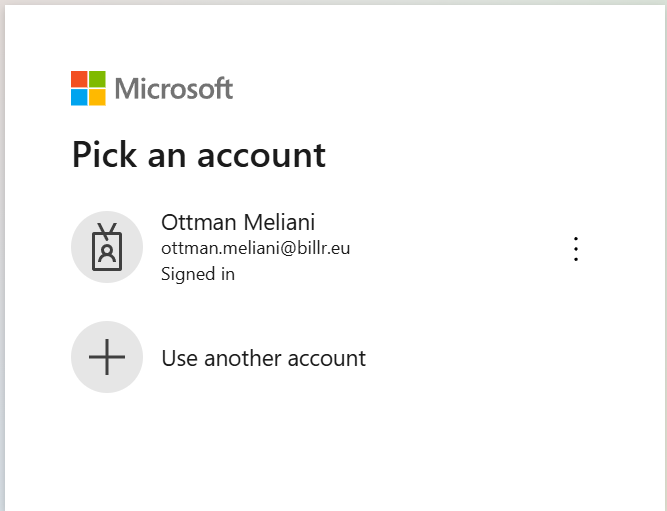
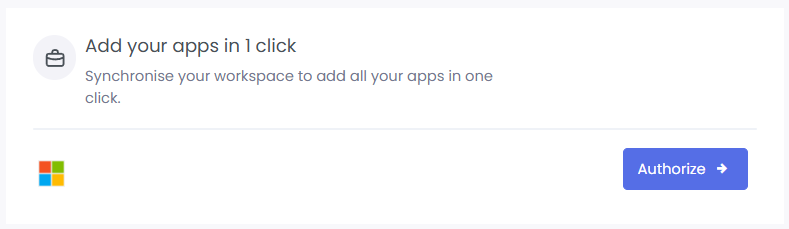 4. You will be redirected to Microsoft. Sign in with an admin account and authorize Boza.
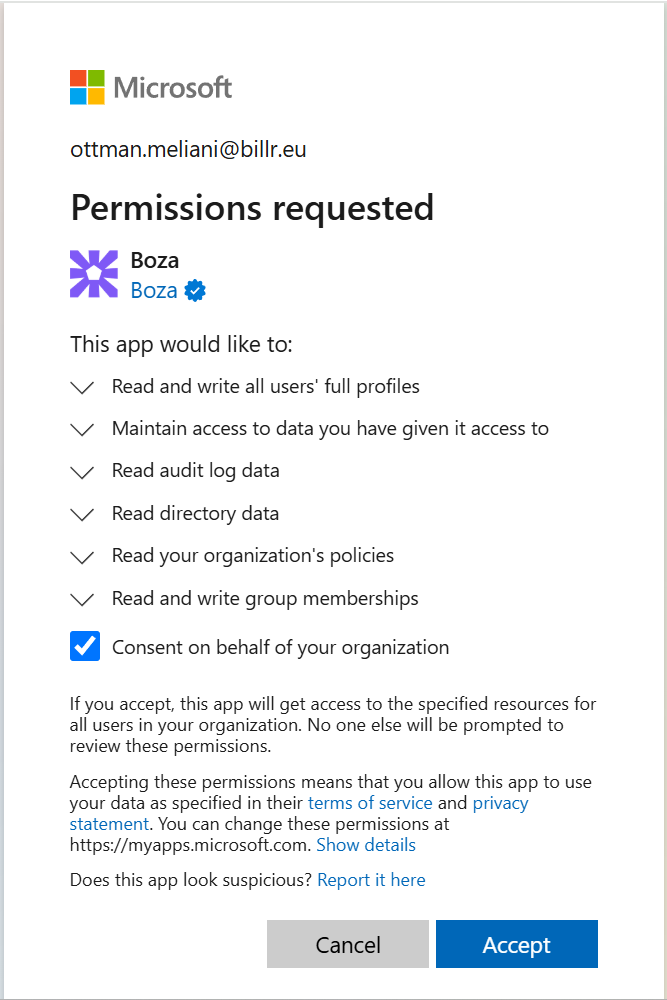 5. Once authorized, synchronization starts automatically.
 ## Required Scopes
Boza accesses Microsoft Graph APIs using the following scopes. For a detailed breakdown, see [Microsoft Entra ID Scopes & Permissions](/docs/settings-and-security/entra-id-scopes.md).
| Scope | Purpose |
| --------------------------- | --------------------------------------------------------------------------------------------------- |
| `User.ReadWrite.All` | Read users and create, update, or delete them during supported onboarding and offboarding workflows |
| `GroupMember.ReadWrite.All` | Read group membership — and update it during onboarding and offboarding |
| `Directory.Read.All` | Read directory data: users, groups, and organizational structure |
| `AuditLog.Read.All` | Read SSO sign-in logs to detect application usage |
| `Policy.Read.All` | Read directory policies |
| `openid`, `offline_access` | Sign in and keep the connection refreshed |
The write scopes (`User.ReadWrite.All`, `GroupMember.ReadWrite.All`) are used for supported [onboarding and offboarding](/docs/user-management/onboarding-offboarding.md) actions. Normal directory, application, license, and sign-in synchronization reads data.
## Synced Data Summary
| Data Type | Source | Purpose |
| ----------------------------------------------------------------- | ------------------------ | -------------------------------- |
| User info (name, email, job title, department, licenses, manager) | Users API | Map your organization structure |
| SSO sign-in timestamps | Audit Logs / Sign-in API | Evaluate application usage |
| Groups | Groups API | Access control and auditing |
| Applications users sign in to | SSO sign-in logs | Build your application inventory |
| License assignments | Subscribed SKUs API | Track license utilization |
## Frequently Asked Questions
**Does Boza modify anything in Microsoft Entra ID?** Only when an administrator runs a supported write workflow. Onboarding can create and update the user and add group memberships; offboarding can delete the user. Review the workflow before approving it.
**How often does Boza sync data?** Data is synchronized automatically on a regular schedule.
**Can I disconnect the integration?** Yes. Open **Integrations → Microsoft Entra ID** and use the available disconnect action. Disconnecting does not reverse changes already completed in Entra ID.
## Need Help?
Contact us at **** if you have questions or encounter issues during setup.
---
# Agent Instructions
This documentation is published with GitBook. GitBook is the documentation platform designed so that both humans and AI agents can read, navigate, and reason over technical content effectively. Learn more at gitbook.com.
## Querying This Documentation
If you need additional information that is not directly available in this page, you can query the documentation by asking a question.
Perform an HTTP GET request on the following URL with the `ask` and `goal` query parameters:
```
GET https://boza.gitbook.io/docs/integrations/microsoft-entra-id.md?ask=&goal=
```
`ask` is the immediate question: it should be specific, self-contained, and written in natural language.
`goal` is what the user is ultimately trying to achieve, the reason they need the answer. Sharing it helps GitBook give you a better, more relevant answer. A goal is most helpful when it describes the outcome the user wants rather than restating the question. For example, with `ask=how do I create an API token`, a goal like `automate deployments from our CI pipeline` lets GitBook tailor the answer to that use case.
The response will contain a direct answer to the question and relevant excerpts and sources from the documentation.
Use this mechanism when the answer is not explicitly present in the current page, you need clarification or additional context, or you want to retrieve related documentation sections.
## Required Scopes
Boza accesses Microsoft Graph APIs using the following scopes. For a detailed breakdown, see [Microsoft Entra ID Scopes & Permissions](/docs/settings-and-security/entra-id-scopes.md).
| Scope | Purpose |
| --------------------------- | --------------------------------------------------------------------------------------------------- |
| `User.ReadWrite.All` | Read users and create, update, or delete them during supported onboarding and offboarding workflows |
| `GroupMember.ReadWrite.All` | Read group membership — and update it during onboarding and offboarding |
| `Directory.Read.All` | Read directory data: users, groups, and organizational structure |
| `AuditLog.Read.All` | Read SSO sign-in logs to detect application usage |
| `Policy.Read.All` | Read directory policies |
| `openid`, `offline_access` | Sign in and keep the connection refreshed |
The write scopes (`User.ReadWrite.All`, `GroupMember.ReadWrite.All`) are used for supported [onboarding and offboarding](/docs/user-management/onboarding-offboarding.md) actions. Normal directory, application, license, and sign-in synchronization reads data.
## Synced Data Summary
| Data Type | Source | Purpose |
| ----------------------------------------------------------------- | ------------------------ | -------------------------------- |
| User info (name, email, job title, department, licenses, manager) | Users API | Map your organization structure |
| SSO sign-in timestamps | Audit Logs / Sign-in API | Evaluate application usage |
| Groups | Groups API | Access control and auditing |
| Applications users sign in to | SSO sign-in logs | Build your application inventory |
| License assignments | Subscribed SKUs API | Track license utilization |
## Frequently Asked Questions
**Does Boza modify anything in Microsoft Entra ID?** Only when an administrator runs a supported write workflow. Onboarding can create and update the user and add group memberships; offboarding can delete the user. Review the workflow before approving it.
**How often does Boza sync data?** Data is synchronized automatically on a regular schedule.
**Can I disconnect the integration?** Yes. Open **Integrations → Microsoft Entra ID** and use the available disconnect action. Disconnecting does not reverse changes already completed in Entra ID.
## Need Help?
Contact us at **** if you have questions or encounter issues during setup.
---
# Agent Instructions
This documentation is published with GitBook. GitBook is the documentation platform designed so that both humans and AI agents can read, navigate, and reason over technical content effectively. Learn more at gitbook.com.
## Querying This Documentation
If you need additional information that is not directly available in this page, you can query the documentation by asking a question.
Perform an HTTP GET request on the following URL with the `ask` and `goal` query parameters:
```
GET https://boza.gitbook.io/docs/integrations/microsoft-entra-id.md?ask=&goal=
```
`ask` is the immediate question: it should be specific, self-contained, and written in natural language.
`goal` is what the user is ultimately trying to achieve, the reason they need the answer. Sharing it helps GitBook give you a better, more relevant answer. A goal is most helpful when it describes the outcome the user wants rather than restating the question. For example, with `ask=how do I create an API token`, a goal like `automate deployments from our CI pipeline` lets GitBook tailor the answer to that use case.
The response will contain a direct answer to the question and relevant excerpts and sources from the documentation.
Use this mechanism when the answer is not explicitly present in the current page, you need clarification or additional context, or you want to retrieve related documentation sections.