> For the complete documentation index, see [llms.txt](https://boza.gitbook.io/docs/llms.txt). Markdown versions of documentation pages are available by appending `.md` to page URLs; this page is available as [Markdown](https://boza.gitbook.io/docs/inventory/applications/app-detail.md).
# App Detail Page
A complete, editable view of a single application — its configuration, owners, usage, costs, documents, architecture, and compliance posture.
Click any application row in the [Applications](/docs/inventory/applications.md) list to open its detail page.
{% hint style="info" %}
A newly discovered app that hasn't been triaged yet shows only the **Users** tab. Once you approve or unapprove it, the full set of tabs (Overview, Users, Costs, Documents, Architecture) appears.
{% endhint %}
***
## Header
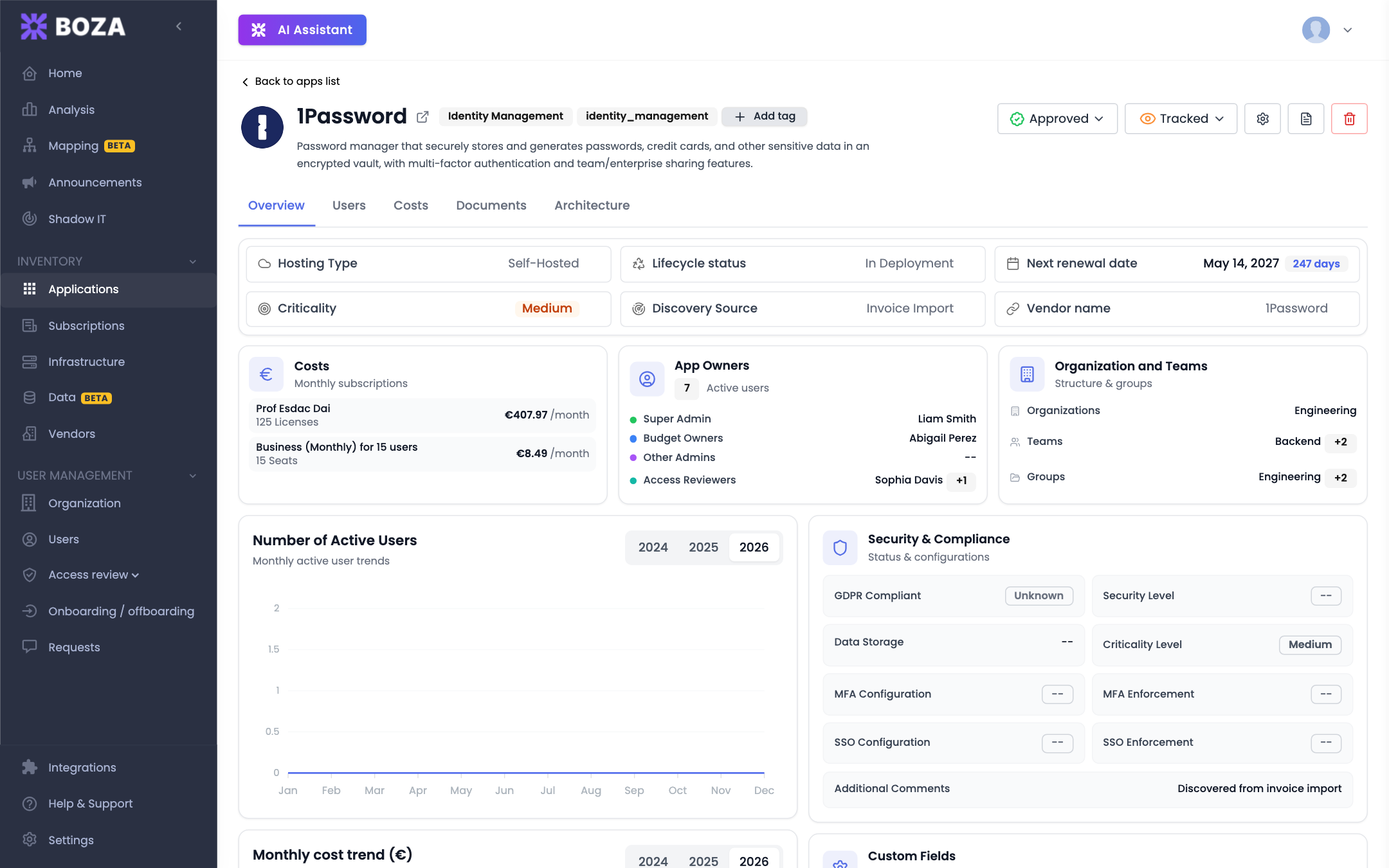
The top of the page shows the application's name and logo, a link to its website, and the controls for its status:
* **Approval status** — a dropdown to set the app to **Approved**, **Unapproved**, or **Under Review**. This determines whether the app is sanctioned and where it appears on the Applications page.
* **Tracked / Untracked** — controls whether Boza actively monitors usage and costs for this app.
Three action buttons sit alongside:
* **Settings** (gear icon) — opens the **Edit** modal to change the app's name, category, description, domain, access URL, hosting type, and lifecycle status.
* **Notes** (document icon) — add or edit free-text notes about the app.
* **Delete** (trash icon) — remove the app from your portfolio.
Tags use their own control in the header rather than the Settings modal.
{% hint style="warning" %}
Deleting an application removes it and its tracking data from your portfolio. This cannot be undone.
{% endhint %}
***
## Overview Tab
The Overview tab summarizes the app through a set of cards. Several are **editable inline** — click the value to change it.
### Property cards
| Property | Editable? | Values |
| --------------------- | --------- | ----------------------------------------------------------------- |
| **Hosting Type** | Yes | SaaS, Self-Hosted, Home-Made |
| **Lifecycle Status** | Yes | In Deployment, Testing, Deployed, Maintenance, Suspended, Retired |
| **Criticality** | Yes | Low, Medium, High |
| **Vendor** | Yes | Pick from your vendors, or create a new one |
| **Discovery Source** | No | Set automatically by Boza (how the app was found) |
| **Next Renewal Date** | No | Derived from subscriptions, with days remaining |
### Summary cards
* **Costs** — the app's top subscriptions by license count, with a link to the full Costs tab.
* **App Owners** — the assigned owners, grouped by role. Click **Edit Owners** to manage them (see below).
* **Organization and Teams** — the org units and teams that use this app (links through to [Organization](/docs/user-management/organization.md) for admins).
* **Security & Compliance** — the app's GDPR and security posture at a glance; click to edit the full set of fields (see below).
Two charts round out the tab: **Number of Active Users** (monthly usage across the year) and **Monthly cost trend (€)** (monthly cost across the year).
***
## Owners & Roles
Open **Edit Owners** from the App Owners card to assign application roles:
* **Super Admin** — the single person ultimately responsible for the app. There can be only one; assigning a new Super Admin replaces the current one.
* **Budget Owner** — responsible for the app's cost and renewals (you can assign several).
* **Admin** — additional administrators of the app (you can assign several).
* **Access Reviewer** — responsible for confirming the app during an [Access Review campaign](/docs/user-management/access-reviews.md) (you can assign several).
A person can hold several roles on the same application, except **Super Admin** and **Admin** cannot be combined. Owners route access, renewal, and review work, so keep the assignments current.
***
## Security & Compliance
Click the Security & Compliance card to record the app's posture. Fields include:
* **GDPR Compliance** — Compliant, Non-Compliant, or Unknown.
* **Security Level** — Satisfactory, Unsatisfactory, or Unknown.
* **Criticality Level** — Low, Medium, High.
* **Data Storage Location** — free text.
* **SLA Indication** — free text.
* **Additional Comments** — free text.
* **Access Modes** — Desktop, Browser, Mobile, Other.
* **SSO Configuration** and **SSO Enforcement**.
* **MFA Configuration** and **MFA Enforcement**.
These values power the **Security & Compliance** filters on the Applications page, so filling them in lets you find, for example, every critical app without enforced MFA.
{% hint style="info" %}
You can also record **Custom Fields** and **Contacts** (Support, Sales, Technical, Billing, Legal, and more) on the app, to keep app-specific information in one place.
{% endhint %}
***
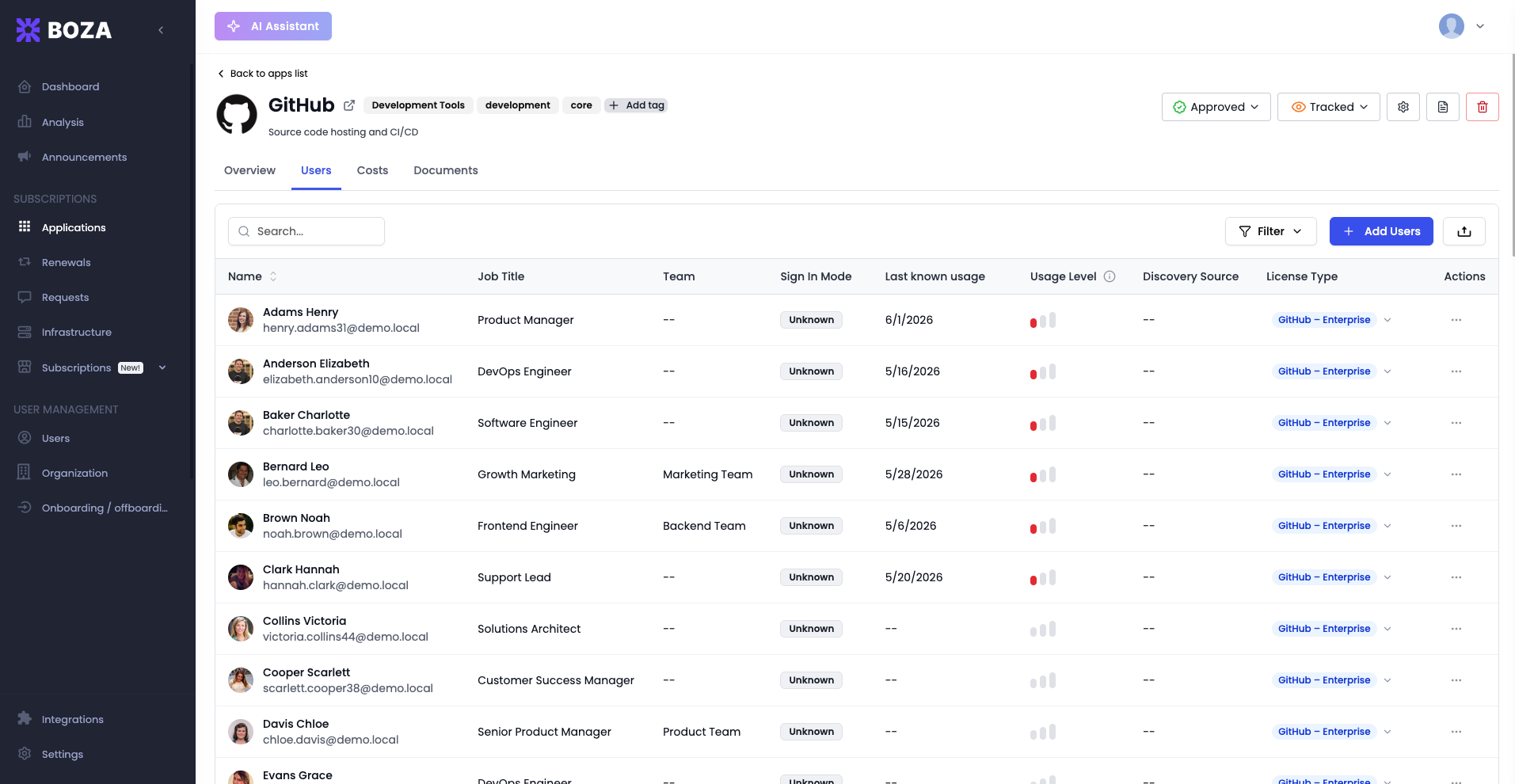
## Users Tab
Lists everyone who has access to — or has been detected using — the application. Filter by **Organization**, **Team**, **Group**, **Subscriptions**, **Status** (activated/deactivated), **Activity** (active/inactive), and **Domains**. Use it to:
* Audit who has access and whether it's still needed.
* Add seats with **Add Users**, or add/remove licenses per user inline.
* **Export data** (upload icon) to download the user list as CSV.
***
## Costs Tab
A detailed view of everything the app costs:
* Four cost cards — **Full year cost**, **Cost YTD**, **Monthly cost**, and **Wasted costs**. Each one states the period it covers, explains itself on hover, and offers a **How calculated** link that shows the sum with this application's own figures, for example `€4,680.40 × 12 months = €56,164.80`.
* A **subscriptions table** listing each subscription, with **Edit details**, **View invoices**, **Update**, **Price history**, conditional **Renew**, and **Delete** actions.
* An **Add ▾** menu to add a subscription — **Create manually** (enter the plan and billing yourself) or **Import from invoice** (upload an invoice and let Boza's AI extract it; see [Upload Invoices](/docs/inventory/subscriptions-and-vendors/upload-invoices.md)).
* A **Payments** panel listing the payments recorded for the application from [Pennylane](/docs/integrations/pennylane.md) or [Powens](/docs/integrations/powens.md). A **Synced** badge shows the connection is active, **Sync lost** that it needs reconnecting, and **Sync spend** starts the connection when none exists.
{% hint style="info" %}
**Full year cost** counts active recurring subscriptions only. An application whose subscriptions are all one-time, or all expired, shows a dash with the excluded amount noted beside it rather than a misleading zero. Payments are a separate measure from subscription cost; a note on the Payments panel explains why the two totals need not match. See [Metrics and Data Freshness](/docs/resources/metrics-and-data-freshness.md#cost-metrics).
{% endhint %}
### Managing a subscription
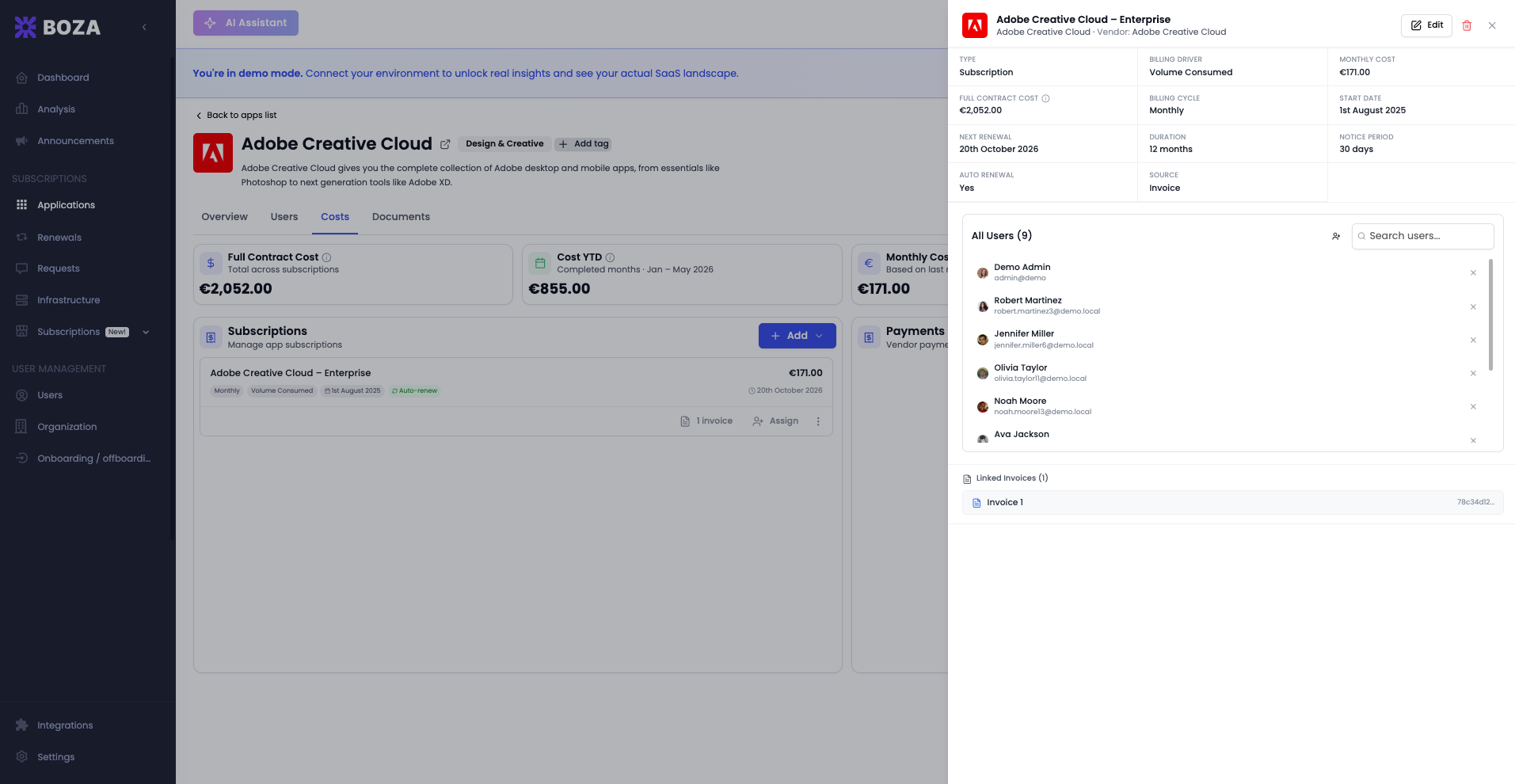
Click a subscription in the table to open its **detail panel** — the billing summary, assigned users, and linked invoices.
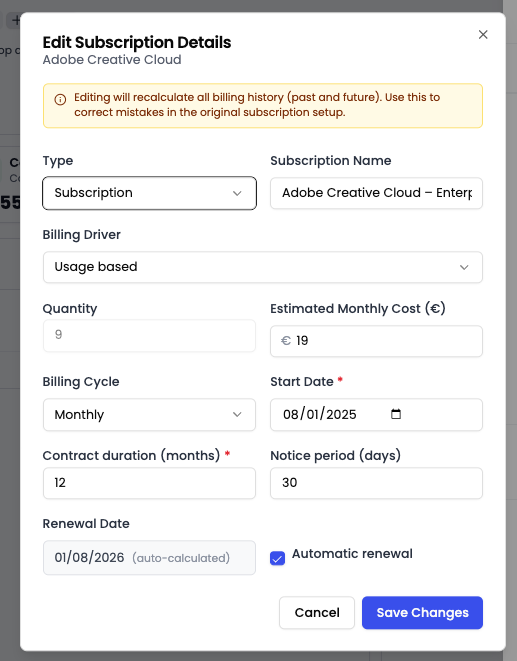
From there, use the **Edit** button or the row's **⋯ menu**. The menu offers **View invoices**, **Update** (apply new pricing going forward while keeping past data), **Price history** (what the subscription cost over time, period by period), **Renew** when the contract is eligible, and **Delete**:
* **Edit details** — change the type, billing driver, quantity, cost, billing cycle, dates, and notice period. Editing recalculates the subscription's billing history (past and future), so use it to correct the original setup.
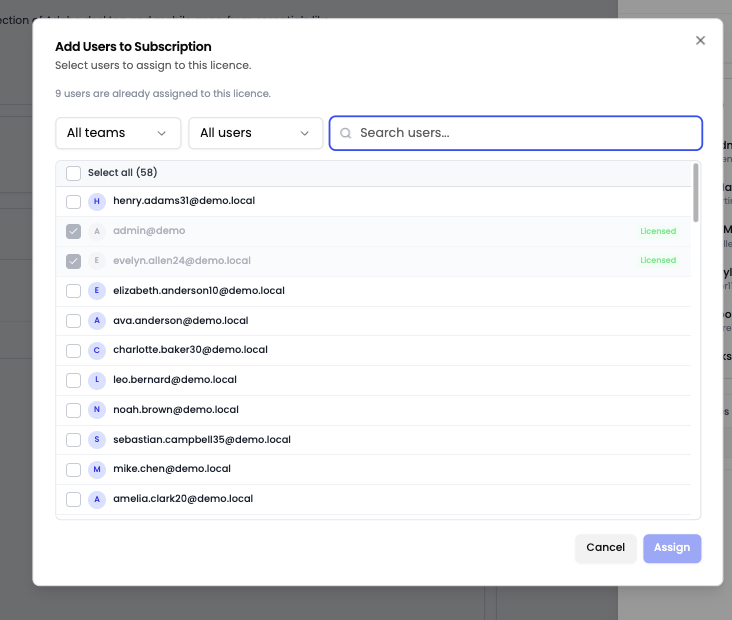
* **Assign users** — attach the subscription's license to specific people so usage and cost are attributed correctly.
For the full financial picture across all apps, see [Subscriptions & Invoices](/docs/inventory/subscriptions-and-vendors.md).
***
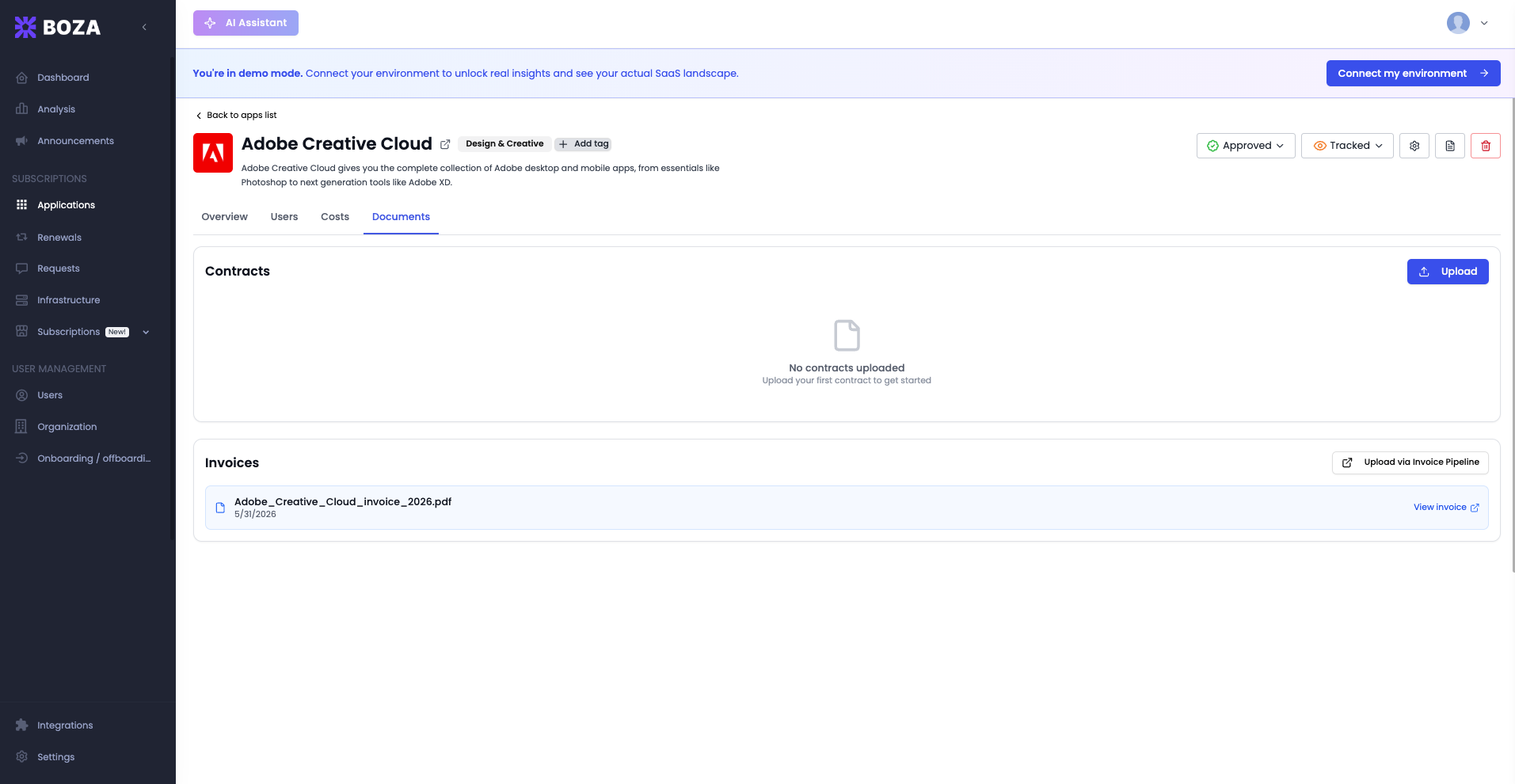
## Documents Tab
Keep the app's paperwork in one place:
* **Contracts** — upload PDF contracts and amendments directly.
* **Linked Invoices** — invoices connected to the app through the [invoice pipeline](/docs/inventory/subscriptions-and-vendors/upload-invoices.md) appear here automatically.
Each document can be viewed, downloaded, or deleted.
***
## Architecture Tab
{% hint style="info" %}
**Beta.** The Architecture tab depends on the [Business Capability Map](/docs/platform/mapping.md), which is a Beta feature.
{% endhint %}
Answers three questions about how the app fits into your organization, in order:
1. **Features** — what your team uses the app for. Boza's AI suggests candidates; tick the ones you use. Use the inline form to add a feature the AI missed and choose the capability it belongs to.
2. **Business Capability** — the parts of your business the app supports. Ticking a feature places the app in the matching capability straight away. A dashed chip marks a suggestion, a solid chip marks a placement your team confirmed, and the tooltip names the features behind it and the confidence. **Open map** jumps to the [Business Capability Map](/docs/platform/mapping.md).
3. **Data & Infrastructure** — the app's hosting model and the servers it runs on, the company data types it touches (from the [Data Inventory](/docs/inventory/data.md)), and the tools it exchanges data with.
Workspace Admins can confirm features and add new ones. Other users see the tab read-only.
***
## Related Links
* [Applications overview](/docs/inventory/applications.md)
* [Authorization Categories](/docs/inventory/applications/authorization-categories.md) — how apps are categorized
* [Shadow IT Detection](/docs/inventory/shadow-it.md) — how new apps are discovered
* [Subscriptions & Invoices](/docs/inventory/subscriptions-and-vendors.md) — manage costs and billing
* [Business Capability Map](/docs/platform/mapping.md) — where this app sits in your business
* [Data Inventory](/docs/inventory/data.md) — the data types this app holds
---
# Agent Instructions
This documentation is published with GitBook. GitBook is the documentation platform designed so that both humans and AI agents can read, navigate, and reason over technical content effectively. Learn more at gitbook.com.
## Querying This Documentation
If you need additional information that is not directly available in this page, you can query the documentation by asking a question.
Perform an HTTP GET request on the following URL with the `ask` and `goal` query parameters:
```
GET https://boza.gitbook.io/docs/inventory/applications/app-detail.md?ask=&goal=
```
`ask` is the immediate question: it should be specific, self-contained, and written in natural language.
`goal` is what the user is ultimately trying to achieve, the reason they need the answer. Sharing it helps GitBook give you a better, more relevant answer. A goal is most helpful when it describes the outcome the user wants rather than restating the question. For example, with `ask=how do I create an API token`, a goal like `automate deployments from our CI pipeline` lets GitBook tailor the answer to that use case.
The response will contain a direct answer to the question and relevant excerpts and sources from the documentation.
Use this mechanism when the answer is not explicitly present in the current page, you need clarification or additional context, or you want to retrieve related documentation sections.