> For the complete documentation index, see [llms.txt](https://boza.gitbook.io/docs/llms.txt). Markdown versions of documentation pages are available by appending `.md` to page URLs; this page is available as [Markdown](https://boza.gitbook.io/docs/inventory/infrastructure.md).
# Infrastructure
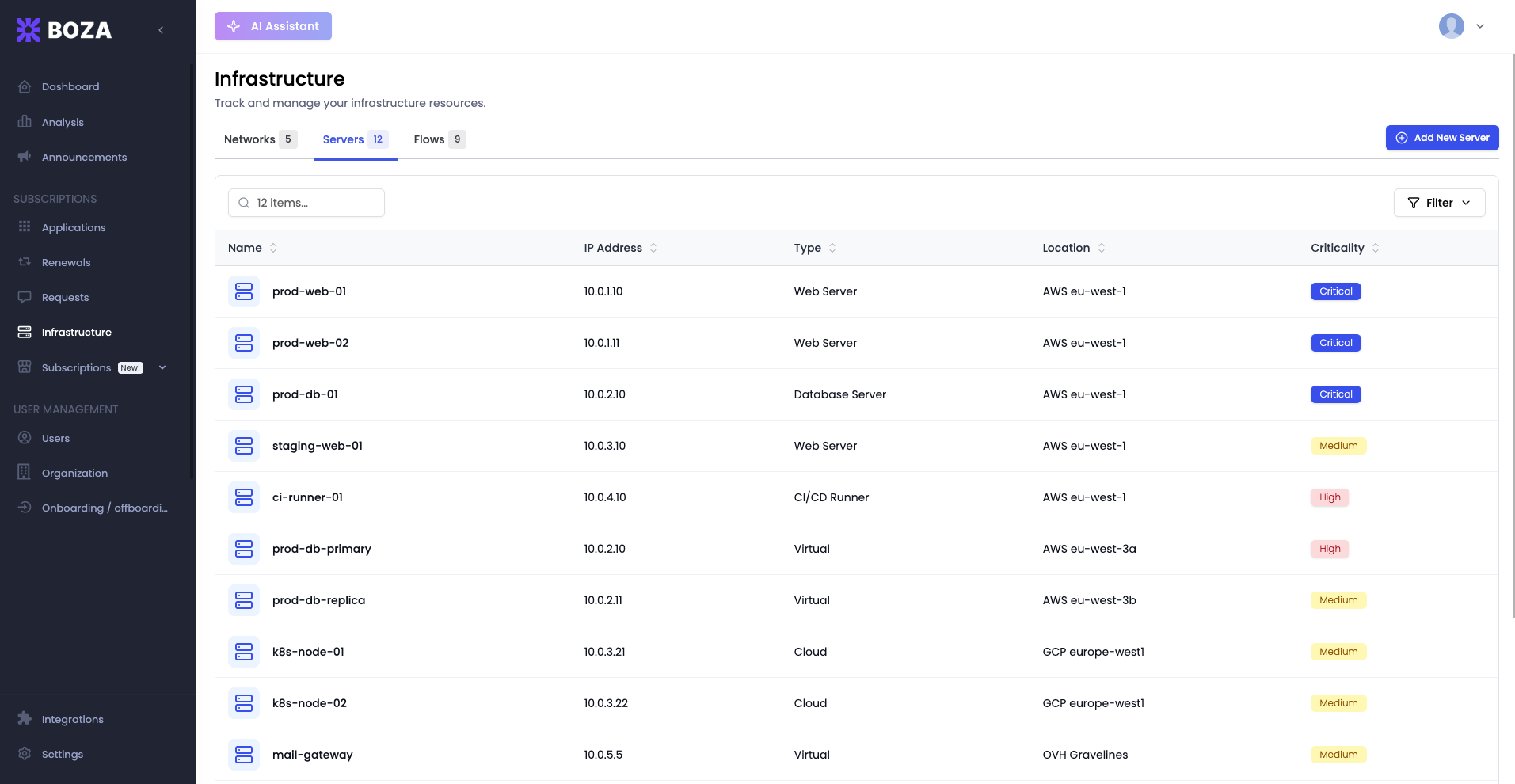
The Infrastructure page lets you document and track the technical resources that underpin your SaaS environment — networks, servers, and data flows. While Boza's other pages focus on applications, users, and costs, this page provides the IT infrastructure layer that connects everything together.
The page subtitle reads *"Track and manage your infrastructure resources."*
***
## Tabs
Three tabs organize your infrastructure inventory by resource type:
| Tab | Description |
| ------------ | -------------------------------------------------------------------------------------------------------------------- |
| **Networks** | The network segments and subnets your organization operates. Each network can be linked to applications and servers. |
| **Servers** | Physical or virtual servers that host or support your SaaS applications and internal tools. |
| **Flows** | Data flows between systems, documenting how information moves across your infrastructure. |
Each tab displays a count badge showing the number of resources of that type.
***
## Networks
The Networks tab lists every network your organization has registered in Boza. A purple **Add New Network** button in the top-right corner lets you create a new entry.
Each row in the networks table displays:
| Column | What it shows |
| ---------------- | -------------------------------------------------------------------------------------------------------- |
| **Name** | The network name, accompanied by a type badge (e.g., LAN, WAN, VPN, OTHER) that categorizes the network. |
| **IP Address** | The network address and subnet mask (e.g., 192.168.1.0/24). |
| **Applications** | Icons for the SaaS applications that run on or are accessible through this network. |
| **Servers** | The number of servers associated with this network. |
Click any network row to view its full details, edit its properties, or manage its linked applications and servers.
{% hint style="info" %}
Linking applications to their networks helps you understand blast radius during outages. If a network goes down, you can immediately see which applications and servers are affected.
{% endhint %}
***
## Servers
The Servers tab inventories the servers your organization relies on. Each entry captures the server's identifying details and its relationships to networks and applications.
To add a server, click the **Add New Server** button, then fill in the server name, IP address, operating system, and any network or application associations.
Use the Servers tab to:
* Maintain an up-to-date inventory of compute resources.
* Map which servers support which applications, making dependency tracking explicit.
* Plan maintenance windows by identifying the applications that depend on a given server.
***
## Flows
The Flows tab documents how data moves between the systems in your infrastructure. Each flow is a connection from a source to a destination — for example, an application sending data to a server, or two servers exchanging files. The table lists every flow with its **Source**, **Destination**, **Protocol**, **Port**, and **Format** for an at-a-glance view of your data exchanges.
### Adding a flow
Click **Add New Flow** and fill in the details across two tabs:
**General**
* **Source server** and **Source app** — where the data originates.
* **Destination server** and **Destination App** — where it goes.
* **Direction** — unidirectional or bidirectional.
* **Notes** — a description of what is exchanged and why.
**Advanced** (all optional)
* **Protocol** (e.g. HTTPS, SFTP, SMTP, TCP) and **Format** (e.g. JSON, CSV, XML).
* **Exchange frequency** (real-time, hourly, daily…) and **Exchange volume**.
* **Port type** and **Port**.
* **Encryption** (e.g. TLS 1.3, SSL, or None).
You must specify at least a source and a destination. Click any flow row to edit or delete it.
{% hint style="info" %}
Documenting data flows is valuable for compliance and audits. When regulators ask how personal data moves through your organization, the Flows tab is a ready-made answer — capture the protocol, encryption, and format for each sensitive exchange.
{% endhint %}
***
## Best Practices
* **Start with networks.** Networks are the foundation. Once your networks are defined, linking servers and applications to them becomes straightforward.
* **Keep server records current.** When you provision or decommission a server, update the Servers tab immediately. Stale records undermine trust in the inventory.
* **Document flows as you discover them.** You do not need to map every flow on day one. Add them incrementally as integration projects, audits, or incident investigations reveal how data moves.
* **Use infrastructure data during incidents.** When an application goes down, check which network and servers it depends on. This accelerates root-cause analysis by narrowing the scope of investigation.
* **Review before compliance audits.** Auditors often ask for network diagrams, server inventories, and data flow documentation. The Infrastructure page consolidates all three in one place.
---
# Agent Instructions
This documentation is published with GitBook. GitBook is the documentation platform designed so that both humans and AI agents can read, navigate, and reason over technical content effectively. Learn more at gitbook.com.
## Querying This Documentation
If you need additional information that is not directly available in this page, you can query the documentation by asking a question.
Perform an HTTP GET request on the following URL with the `ask` and `goal` query parameters:
```
GET https://boza.gitbook.io/docs/inventory/infrastructure.md?ask=&goal=
```
`ask` is the immediate question: it should be specific, self-contained, and written in natural language.
`goal` is what the user is ultimately trying to achieve, the reason they need the answer. Sharing it helps GitBook give you a better, more relevant answer. A goal is most helpful when it describes the outcome the user wants rather than restating the question. For example, with `ask=how do I create an API token`, a goal like `automate deployments from our CI pipeline` lets GitBook tailor the answer to that use case.
The response will contain a direct answer to the question and relevant excerpts and sources from the documentation.
Use this mechanism when the answer is not explicitly present in the current page, you need clarification or additional context, or you want to retrieve related documentation sections.