> For the complete documentation index, see [llms.txt](https://boza.gitbook.io/docs/llms.txt). Markdown versions of documentation pages are available by appending `.md` to page URLs; this page is available as [Markdown](https://boza.gitbook.io/docs/inventory/renewals.md).
# Renewals
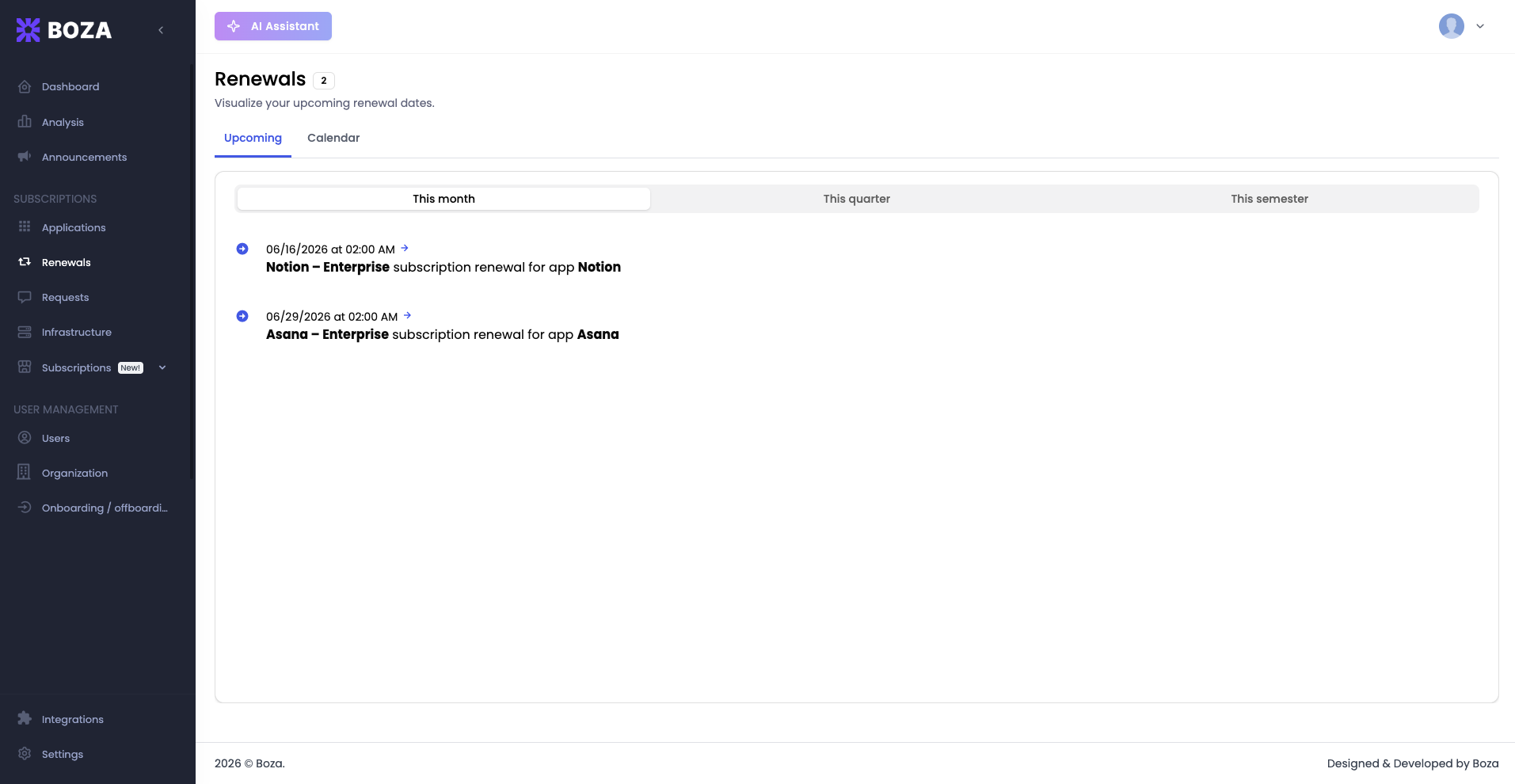
The Renewals page gives you a forward-looking view of every subscription renewal on your calendar. Instead of discovering a renewal after it has already auto-renewed, you can plan ahead — renegotiate terms, adjust seat counts, or cancel subscriptions you no longer need, all before the deadline arrives.
The page header displays a **count badge** next to the title showing the number of renewals in the current half-year, along with the subtitle *"Visualize your upcoming renewal dates."*
***
## Tabs
Two tabs let you switch between complementary views:
* **Upcoming** — a chronological list sorted by date, closest first. Best for quick scanning and action planning.
* **Calendar** — a year-at-a-glance grid with renewal dates marked. Best for spotting clusters and planning workload across the year.
Both tabs reflect the same data, so changes to a renewal date appear in both views immediately.
***
## Time Filters
On the **Upcoming** tab, three filters control how far ahead you are looking:
* **This month** — renewals due within the current calendar month.
* **This quarter** — renewals due within the current quarter.
* **This semester** — renewals due within the current six-month period.
IT teams running monthly reviews will typically use **This month**, while finance teams preparing forecasts may prefer **This quarter** or **This semester**.
***
## Renewal List
Each entry in the Upcoming tab reads as *"\[subscription] subscription renewal for app \[application]"* alongside its **renewal date** — for example, *"Business Pro – Annual subscription renewal for app Acme."*
Entries are read-only. To review a subscription's terms, cost, or assigned users, open the linked application from the [Applications](/docs/inventory/applications.md) page.
***
## Calendar View
The Calendar tab shows a year-at-a-glance grid with each renewal marked on its date, and a header counting this month's renewals. You can switch between month, week, and multi-month layouts.
Use the calendar to:
* Identify weeks where multiple renewals overlap so you can batch your review work.
* Spot gaps in your renewal schedule that might indicate missing subscription data.
* Share a visual snapshot with stakeholders who prefer calendar-based planning.
***
## Best Practices
* **Set your review cadence.** Check the Renewals page at least once per week. Renewals that sneak past unreviewed are the most common source of avoidable SaaS spend.
* **Start early.** Begin vendor negotiations at least 30 days before the renewal date. Many contracts include auto-renewal clauses with cancellation windows that close well before the actual date.
* **Cross-reference with usage data.** Before renewing, visit the linked application's detail page to review license utilization. If a significant portion of seats are unused, use that data as leverage to downsize the plan.
* **Use the semester filter for budgeting.** When preparing quarterly or annual budget forecasts, the **This semester** filter gives you the broadest view of upcoming financial commitments.
{% hint style="info" %}
If a renewal date looks incorrect, correct the subscription itself: the renewal date is calculated from the start date and the contract duration, so use **Edit details** to fix the dates, or **Renew** to open the next cycle. The Renewals page reads directly from subscription data, so corrections propagate automatically.
{% endhint %}
{% hint style="info" %}
Renewal alerts also appear in the Dashboard's Alerts panel. The Renewals page provides the complete, filterable list — use the Dashboard for a quick daily glance and the Renewals page for deeper planning sessions.
{% endhint %}
---
# Agent Instructions
This documentation is published with GitBook. GitBook is the documentation platform designed so that both humans and AI agents can read, navigate, and reason over technical content effectively. Learn more at gitbook.com.
## Querying This Documentation
If you need additional information that is not directly available in this page, you can query the documentation by asking a question.
Perform an HTTP GET request on the following URL with the `ask` and `goal` query parameters:
```
GET https://boza.gitbook.io/docs/inventory/renewals.md?ask=&goal=
```
`ask` is the immediate question: it should be specific, self-contained, and written in natural language.
`goal` is what the user is ultimately trying to achieve, the reason they need the answer. Sharing it helps GitBook give you a better, more relevant answer. A goal is most helpful when it describes the outcome the user wants rather than restating the question. For example, with `ask=how do I create an API token`, a goal like `automate deployments from our CI pipeline` lets GitBook tailor the answer to that use case.
The response will contain a direct answer to the question and relevant excerpts and sources from the documentation.
Use this mechanism when the answer is not explicitly present in the current page, you need clarification or additional context, or you want to retrieve related documentation sections.