> For the complete documentation index, see [llms.txt](https://boza.gitbook.io/docs/llms.txt). Markdown versions of documentation pages are available by appending `.md` to page URLs; this page is available as [Markdown](https://boza.gitbook.io/docs/platform/ai-assistant.md).

# Boza AI Assistant

Ask natural-language questions about your applications, usage, subscriptions, spend, and renewals without building a report first.

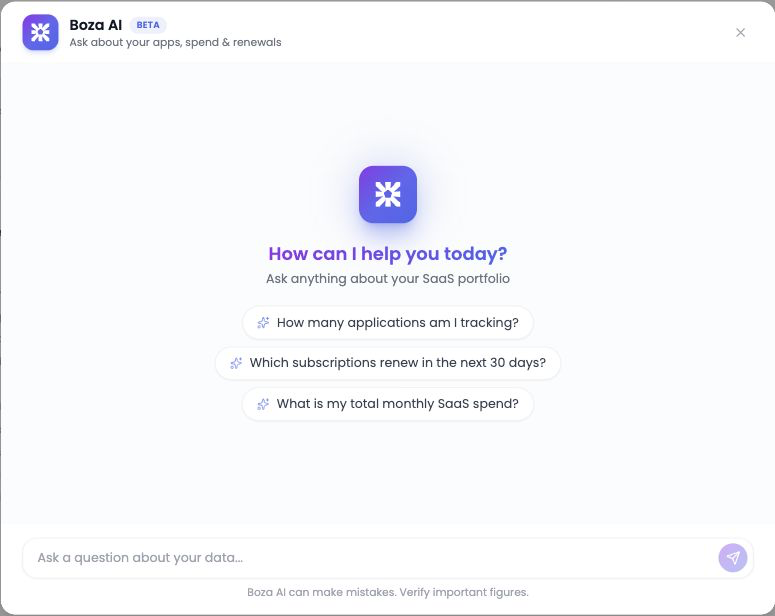
<figure><img src="https://1674559363-files.gitbook.io/~/files/v0/b/gitbook-x-prod.appspot.com/o/spaces%2FvSdGShklbloRzyUwwMzX%2Fuploads%2Fgit-blob-6d2c7d94d6ca116c8d7f042bc6a2526a536180b1%2Fboza-ai-assistant.png?alt=media" alt="Boza AI Assistant panel for asking questions about applications, spend, and renewals"><figcaption><p>Open Boza AI from the platform and ask a focused question about your workspace data.</p></figcaption></figure>

{% hint style="warning" %}
**Beta:** Boza AI is read-only and cannot change your data, but AI-generated answers can be incomplete or incorrect. Verify important figures in the relevant Boza page or export before using them for financial, compliance, or audit decisions.
{% endhint %}

***

## Availability and Access

Boza AI is available to signed-in users who can see the assistant in their workspace. Answers are limited to the current organization's Boza data.

{% hint style="warning" %}
The current release does not apply application ownership, team, or Access Reviewer assignments to AI results. Any authenticated platform user with access to the assistant can ask organization-wide questions. Review platform membership before enabling broad use.
{% endhint %}

The assistant is **read-only**. It cannot:

* Approve, track, edit, or delete applications.
* Assign users, owners, or licenses.
* Launch campaigns, send notifications, or complete workflows.
* Change subscriptions, payments, invoices, or integrations.

If Boza AI is not visible in your workspace, contact your administrator or **<support@getboza.io>**.

***

## Ask a Good Question

The best questions include the subject, scope, and time period you care about.

| Instead of              | Ask                                                                    |
| ----------------------- | ---------------------------------------------------------------------- |
| “What is our spend?”    | “What was our SaaS spend in EUR for the last completed calendar year?” |
| “Show renewals.”        | “Which subscriptions renew in the next 90 days?”                       |
| “Find unused licenses.” | “Which apps have licenses assigned to inactive users?”                 |
| “How are apps doing?”   | “Which approved apps have no Super Admin?”                             |

Other useful starting points:

* “Compare SaaS spend this year with last year.”
* “Which departments use Salesforce?”
* “Which recently discovered apps are still under review?”
* “How many tracked applications are in this workspace?”

***

## Use the Assistant

1. Open **Boza AI** from the platform.
2. Enter one clear question about your organization's data.
3. Review the answer, including its time period, filters, status definitions, and currency.
4. Select a suggested follow-up, or ask your own follow-up to narrow the result.
5. Use **thumbs up** or **thumbs down** to tell Boza whether the answer was useful.
6. If the result can be charted, use the chart below the answer to compare the returned rows.
7. To receive a **Download CSV** action, explicitly ask to “export” or “download” the data in your question.
8. Verify material figures in the source page or a CSV export.

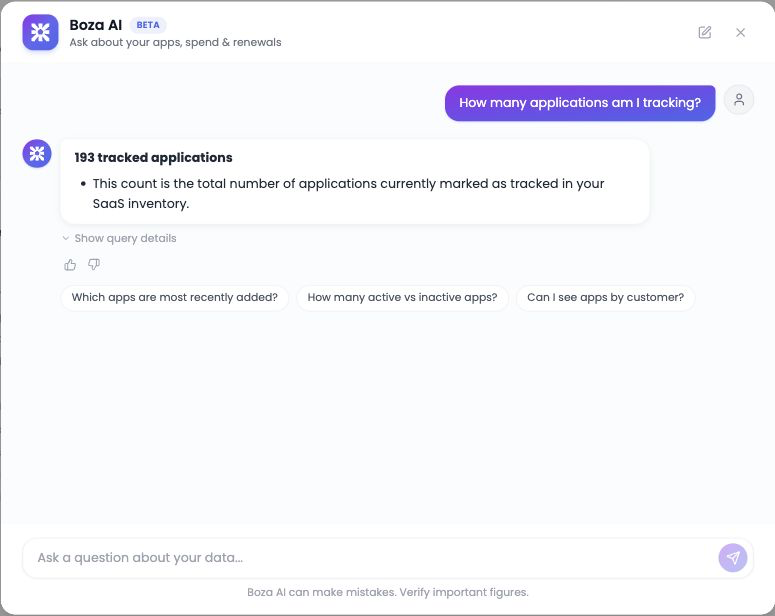
<figure><img src="https://1674559363-files.gitbook.io/~/files/v0/b/gitbook-x-prod.appspot.com/o/spaces%2FvSdGShklbloRzyUwwMzX%2Fuploads%2Fgit-blob-135728d072c25b81ccbcb5d2163226a9ed4e25fc%2Fboza-ai-assistant-answer.png?alt=media" alt="Boza AI answer showing a tracked-application total, follow-up suggestions, query details, and feedback controls"><figcaption><p>A real read-only answer includes a concise result, suggested follow-up questions, optional query details, and feedback controls.</p></figcaption></figure>

The assistant keeps the context of the current conversation, so follow-ups such as “only approved apps” or “compare that with last year” can refine the previous answer.

***

## Manage Your Conversations

Conversations are stored in your workspace rather than in a single browser thread, so they survive a refresh and follow you between devices.

The sidebar lists your previous conversations grouped as **Today**, **Yesterday**, **Previous 7 days**, and **Older**.

* Click **New conversation** to start a fresh thread.
* Use **Search a conversation** to find an earlier thread by name.
* Use a conversation's menu to **Rename** or **Delete** it.

The first time you open the assistant after this change, any thread already stored in your browser is carried over as your first saved conversation.

{% hint style="warning" %}
Deleting a conversation removes it from the sidebar and cannot be undone from the interface. It does not remove the separate audit record described under [Data and Privacy](#data-and-privacy).
{% endhint %}

***

## Understand the Answer

Boza AI converts your question into a read-only query against your organization's Boza data, then formats the result as a concise answer. Large result sets may be summarized instead of listing every row.

Keep these points in mind:

* Results with roughly 2–60 rows and compatible columns can render as a chart. The chart is another view of the returned data, not a separate calculation.
* **Download CSV** appears only when the question explicitly requests an export or download. The file contains the full returned result, even when the written answer is summarized.
* **Latest** normally means the latest non-future period available in the data.
* **No usage recorded** is not always the same as zero usage; it can indicate missing or unsynced activity.
* Costs depend on the stored billing period, quantity, currency, and subscription data.
* Usage, directory, and payment results are only as current as their underlying integration or import.
* Suggested follow-ups are generated from the conversation and may still need a clearer scope.

***

## Verify Important Figures

Before sharing an answer or making a decision:

1. Confirm the organization, date range, statuses, and currency in the answer.
2. Open the relevant source page:
   * [Applications](/docs/inventory/applications.md) for inventory, status, owners, and users.
   * [Subscriptions & Invoices](/docs/inventory/subscriptions-and-vendors.md) for contracts, license quantities, and billing.
   * [Analysis](/docs/platform/analysis.md) for usage, payments, and renewal views.
3. Check the integration's last sync when the result depends on external data.
4. Apply the same filters and compare the source figures.
5. Use [Reports & Exports](/docs/resources/reports-and-exports.md) when you need evidence or row-level review.

{% hint style="danger" %}
Do not use an AI answer as the sole record for an audit, access decision, invoice reconciliation, or financial approval.
{% endhint %}

***

## Data and Privacy

* Questions are evaluated through OpenAI within the current Boza organization. Answer generation can include the question, recent conversation, schema context, generated read-only query, and a capped sample of the query result.
* Successful questions and their generated SQL are stored as tenant-scoped reusable examples. Up to three similar examples from the same organization can be included in a later query-generation prompt.
* Thumbs-up and thumbs-down feedback changes whether the latest matching example is eligible for future reuse.
* A separate audit record contains the question, generated query, outcome, user, organization, and timing.
* The reusable example and audit record do not contain the full query-result rows. The current interface does not provide self-service inspection or deletion of stored examples, or display their retention period.

Ask questions about business data you are authorized to use, and avoid entering secrets, passwords, access tokens, or personal information that is not needed for the analysis.

See [Data Privacy & GDPR](/docs/settings-and-security/data-privacy-gdpr.md#boza-ai-assistant) for the complete data flow, organization-wide authorization scope, and review requirements.

***

## Troubleshooting

### The answer is too broad

Add a date range, application status, team, department, owner, or currency. Ask one comparison at a time.

### The result is empty

Check spelling and scope, then try a broader period. Confirm that the relevant integration or import contains data. Remember that missing usage data is different from measured zero usage.

### A figure looks wrong or out of date

Ask the assistant to state its date range and filters, then compare the source page. Check the last successful sync for data supplied by an [integration](/docs/integrations/integrations.md).

### The assistant cannot answer

Simplify the question, remove unrelated requests, or start with the underlying entity—for example, applications first and spend second. Retry later if the service reports an error.

### The assistant is unavailable

Refresh Boza and sign in again. If the problem continues, contact **<support@getboza.io>** with the time of the error and the wording of the question, but do not include confidential query results.

***

## Best Practices

* Ask one well-scoped question at a time.
* Name the period, currency, status, or team when it matters.
* Use follow-ups to narrow a result instead of repeating the whole question.
* Distinguish missing data from a true zero.
* Give feedback on useful and unhelpful answers.
* Verify important results in source pages and exports.


---

# Agent Instructions
This documentation is published with GitBook. GitBook is the documentation platform designed so that both humans and AI agents can read, navigate, and reason over technical content effectively. Learn more at gitbook.com.

## Querying This Documentation
If you need additional information that is not directly available in this page, you can query the documentation by asking a question.

Perform an HTTP GET request on the following URL with the `ask` and `goal` query parameters:

```
GET https://boza.gitbook.io/docs/platform/ai-assistant.md?ask=<question>&goal=<user_goal>
```

`ask` is the immediate question: it should be specific, self-contained, and written in natural language.
`goal` is what the user is ultimately trying to achieve, the reason they need the answer. Sharing it helps GitBook give you a better, more relevant answer. A goal is most helpful when it describes the outcome the user wants rather than restating the question. For example, with `ask=how do I create an API token`, a goal like `automate deployments from our CI pipeline` lets GitBook tailor the answer to that use case.

The response will contain a direct answer to the question and relevant excerpts and sources from the documentation.

Use this mechanism when the answer is not explicitly present in the current page, you need clarification or additional context, or you want to retrieve related documentation sections.