> For the complete documentation index, see [llms.txt](https://boza.gitbook.io/docs/llms.txt). Markdown versions of documentation pages are available by appending `.md` to page URLs; this page is available as [Markdown](https://boza.gitbook.io/docs/resources/changelog.md).

# Changelog

The most useful changes to Boza, explained in plain language. Each release note tells you what changed, why it matters, and where to use it.

{% hint style="info" %}
**Need setup instructions?** Follow the links in each update for the complete step-by-step guide. Features can depend on your role, connected integrations, and available workspace data.
{% endhint %}

***

## October 13, 2026 — Your organization in Boza, targeted access reviews, and exports ready for Excel

<figure><img src="https://1674559363-files.gitbook.io/~/files/v0/b/gitbook-x-prod.appspot.com/o/spaces%2FvSdGShklbloRzyUwwMzX%2Fuploads%2Fgit-blob-c9505dea6b6b84fc7dc9d45c42974358fbe44288%2Fboza-changelog-2026-10-13-organization.jpg?alt=media" alt="The Organization page: the Product &#x26; Design and Engineering organizations, their teams, members, applications and the cost of the licences assigned to them"><figcaption><p>Your organizations and teams, with their headcounts and costs</p></figcaption></figure>

This release gives your organization its own page, lets each access review campaign cover the applications you choose, makes every inventory exportable in a format Excel opens cleanly, and asks less of your directory: a read-only connection is now enough.

### Build your organization in Boza

The new **Organization** page, under User management, shows your organizations and teams, their leads, their members and the cost of the licences assigned to them.

* **A structure that follows your directory, or that you manage in Boza.** Mirror Google Workspace or Microsoft Entra ID, read-only, or build the structure in Boza, from scratch or from a copy of your directory. You choose once.
* **A structure managed in Boza is never overwritten by the directory sync.** People, groups and application access keep syncing; the structure is yours.
* **Create, rename, move.** Organizations, teams and leads are created from the page, and a person moves from one team to another in one step.
* **People without a team** have their own list beside the structure, with a team suggestion taken from the directory, a search, and assignment in bulk.
* **Departed people are hidden** everywhere on the page; a switch shows them when a team still counts some.
* **Headcounts count active people only**, and the cost is labelled "Cost of assigned licences", with a note on flat fees that do not split per person.
* **Where the structure comes from is always stated** at the top of the page: synced from your directory, or managed in Boza.

**Why it matters:** the structure in an identity provider exists for device policies and security, not to describe how a company works. Three clients asked to build theirs in Boza; now they can, and a sync never undoes it.

[Organize your structure →](/docs/user-management/organization.md)

### Your directory connection, read-only

* **Read access is all Boza needs** from Google Workspace or Microsoft Entra ID to read your users, groups and application access. The connection no longer asks for write permissions.
* **Write access is separate and optional.** It only serves onboarding, offboarding and the browser extension deployment, and you grant or remove it from the integration's panel at any time. An integration already connected keeps working.
* **One row per directory on the Integrations page**, marked "Read-only" or "Read + write", and the integrations that need an administrator account say so before you connect.

[Integrations →](/docs/integrations/integrations.md)

### Choose the applications an access review covers

* **All approved applications, as before, or a selection** of your choice, in the campaign configuration. Reviewers only receive the applications you picked.
* **One list per occurrence** when you run several reviews a year, with an option to keep the same list every time.
* **The perimeter is shown** on the campaign card, in its detail and in its CSV export.

[Configure campaigns →](/docs/user-management/access-reviews/configure-campaigns.md)

### Every inventory exports, from one place

* **New exports for every inventory**: users, subscriptions, infrastructure, dataflows, data, vendors, organization, Shadow IT and access reviews, in addition to applications and the capability map.
* **All of them in Settings, section Export**, with "Export all data" to download the whole workspace as one ZIP. Each page keeps its own Export button.
* **One format, ready for Excel**: separators, dates and headers in the language of your workspace, and readable labels instead of internal codes.
* **Subscriptions by status**: approved, pending, to check, failed or all, with a Validation column.
* **The capability map as CSV or PDF.**
* **An empty export says so** instead of downloading an empty file.
* **Exports are for administrators**, except the Applications list export, and their button no longer shows for other roles.

[Reports and exports →](/docs/resources/reports-and-exports.md)

### Your applications, under your names and with your logos

* **Rename any application for your workspace**, from its settings, not only the ones you added yourself. The shared catalog keeps its name; "Reset" brings it back.
* **Rename a subscription** the same way, from its edit window, with its original name shown under the field.
* **Search finds an application under both names**, and yours is used in lists, on the application page, in exports and in emails.
* **Upload your own logo** for an application, in PNG, JPEG or WebP up to 5 MB, visible only in your workspace. "Remove the custom logo" restores the catalog one.
* **A coloured monogram for applications without a logo**: two letters on a colour of their own, which does not change when you rename the application.

### Contacts shared with the vendor

* **Share an application contact with its vendor**: the box is ticked by default when you add the contact.
* **Add a vendor contact to all the applications** of that vendor, in one go.
* **A change made on a shared contact is applied everywhere.**
* **Nothing is overwritten**: a contact you chose for an application is never replaced by the vendor's, and the same email address never creates a duplicate.

[Vendor directory →](/docs/inventory/vendors.md)

### Interface

* **Empty pages show what to do**: a page without data shows a preview of what it will hold and the first step to fill it.
* **A skeleton while loading** instead of an empty page, and a message with "Retry" when loading fails, on Infrastructure and Requests.
* **Dialogs no longer lose what you typed**: Escape, a click outside or the cross ask for confirmation if you changed something, and nothing closes during a save.
* **One shared side panel** for users, subscriptions, onboarding and offboarding, and the applications of the capability map, with deletion in the "…" menu.
* **Servers, networks and flows open in that panel** and save field by field, without a Save button.
* **Review an invoice**: one card per line with its status, grouped fields, the computed total and a bar that counts the lines left.
* **Data inventory**: AI drafts are confirmed line by line or all at once, new rows arrive on top, and the button is called "Update with AI".
* **Adding an application you already have**: the search shows its status and offers to add it to your applications or open it, and renaming an application to a catalog name offers to merge them.
* **An application's settings** fit on a two-column form.
* **The collapsed sidebar stays collapsed** after a reload, and the access review opens as a flyout menu from it.
* **The capability map pans with a two-finger scroll**; pinching zooms.
* **The Back button of an application page** returns to the page you came from.
* **A star marks content produced by AI**, drafts and detections alike.
* **The What's new window** presents these changes at your next sign-in.

### Fixes

* **Costs, renewals**: a renewal no longer removes the previous months from the year-to-date cost or from the charts.
* **Costs, past months**: each month is counted at the price in force that month, and the same calculation serves the map, the chart, the Applications list, vendors and users.
* **Costs, "vs last year"**: the comparison covers the same months of both years, each year at its own prices.
* **Costs, one-time purchases**: they count once, in the month of the purchase.
* **Renewals**: the page no longer fails, each renewal is attached to its subscription, and a renewal sends one email even with several owners (live since September 18).
* **"Renew" on an obsolete subscription** opens the renewal window.
* **Applications**: "To handle" only counts the licences nobody holds (live since September 23).
* **Spend import**: the provided templates are read, refunds are kept, and every line is reported.
* **Exports**: the user count counts each active user once, like the list.
* **Settings**: the administrators list no longer shows everyone as an administrator while it loads, and the currency, not configurable yet, can no longer be changed by mistake.
* **Infrastructure**: a flow with a port saves, and the notes of a new server are kept.
* **Application settings**: the button no longer stays stuck on "Saving…".
* **Data inventory**: a data type's panel scrolls down to its Delete button.
* **Add users window**: the layout is fixed and real photos are shown.
* **Microsoft sign-in**: guests and aliases get their own account back.
* **Visible errors**: an action that fails (a decision on a request, a tag, a vendor, the subscriptions list) shows a message instead of failing silently.
* **Ghost pages removed**: the "Coming soon" pages reachable by URL and the fixed-figures optimization gauge of the cost analysis are gone.

***

## September 19, 2026 — The Applications list, your way

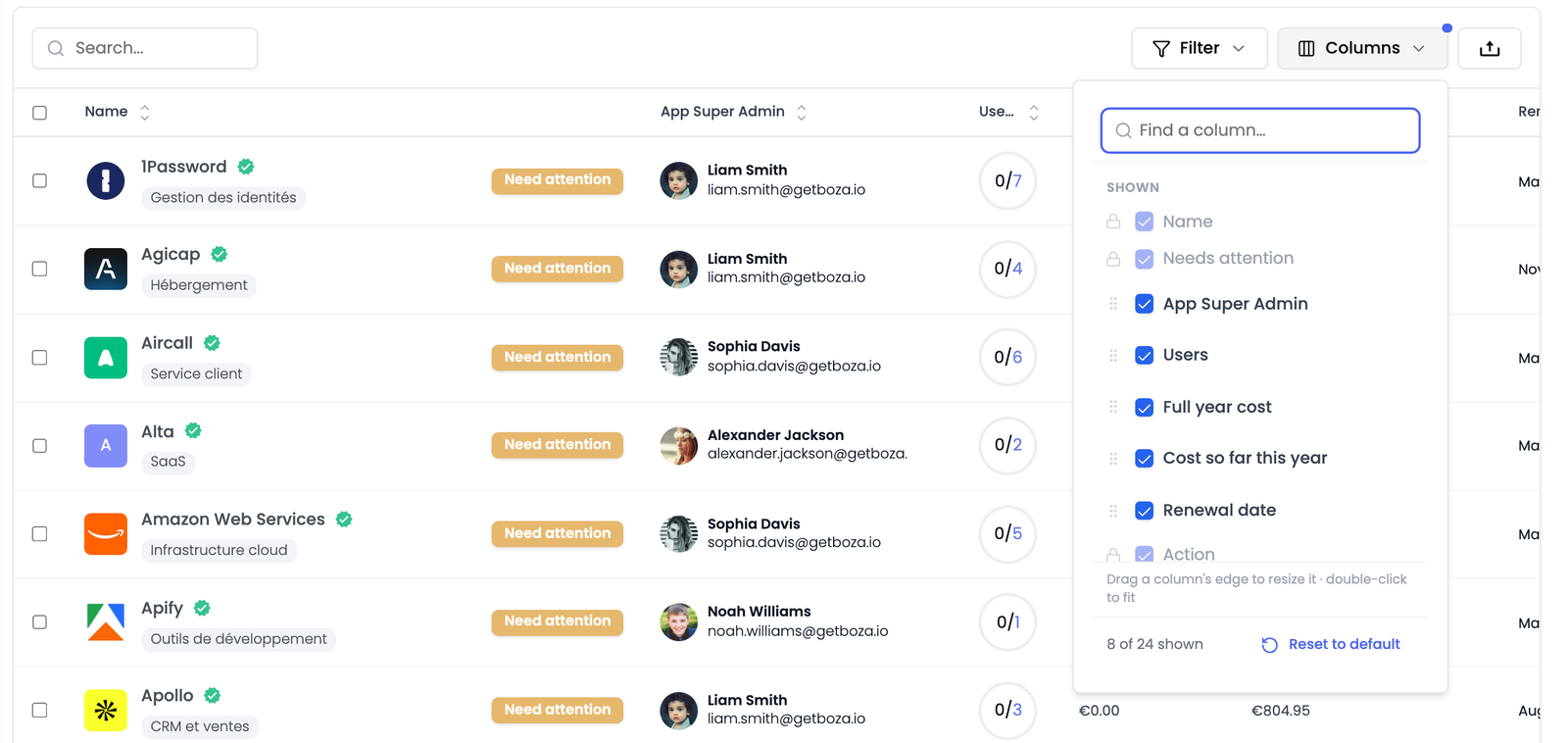
<figure><img src="https://1674559363-files.gitbook.io/~/files/v0/b/gitbook-x-prod.appspot.com/o/spaces%2FvSdGShklbloRzyUwwMzX%2Fuploads%2Fgit-blob-fe1e506ac192bfc3ac7ae3f6d53d514d02cea606%2Fboza-changelog-2026-09-19-columns.png?alt=media" alt="The Columns panel open over the Applications table, listing the shown columns with drag handles, a search box and a reset control"><figcaption><p>Show, hide and reorder from one panel. Your custom fields are in the same list.</p></figcaption></figure>

The Applications list arrived with a fixed set of columns, the same for everyone in every workspace. A finance lead and a security lead were reading the same table and ignoring different halves of it. Now each person shapes it for the job they actually do.

### Choose the columns you actually use

The **Columns** button sits above the table, next to Filter.

* **Show what you need, hide what you do not.** Twenty-one columns are available, from Renewal date and Full year cost to Vendor, Budget owner, Other admins, Access reviewer, Organization, Teams and Groups. Search the list by name when it gets long.
* **Put them in the order you read them.** Drag a column up or down, or use the arrows. **Name** stays first and **Action** stays last, so the row always begins with the application and ends with its menu.
* **Resize, or fit to the content.** Drag a column's edge to make it wider or narrower. Double-click that edge and the column sizes itself to what it holds.
* **Your custom fields are columns too.** Anything your team defined appears in its own section of the panel, alongside the columns Boza ships with.
* **Start again whenever you like.** **Reset to default** restores the original set and order.

### The layout is yours, and it follows you

The layout is saved to your account rather than to your browser, so you find the same table on another machine or after clearing your cookies. It belongs to you alone: changing it changes nothing for your colleagues, and an admin's layout is not imposed on anyone.

**Why it matters:** a table that shows twenty columns to everyone shows the wrong twenty to almost everyone. The people who own renewals, the people who own budgets, and the people who own access reviews each need a different five, and now each of them has it.

[Choose your table columns →](/docs/tutorials/choose-your-table-columns.md)

***

## September 9, 2026 — Boza in French, emails from your own address, and merging in bulk

<figure><img src="https://1674559363-files.gitbook.io/~/files/v0/b/gitbook-x-prod.appspot.com/o/spaces%2FvSdGShklbloRzyUwwMzX%2Fuploads%2Fgit-blob-a2e053449bae7b25b5d45e2702e19992fde5d7d1%2Fboza-changelog-2026-09-09-french.png?alt=media" alt="Illustration: the Boza Applications page in French"><figcaption></figcaption></figure>

This release is about the people who see Boza without having chosen it: your employees. The whole product now speaks their language, the emails they receive can come from your own address, and the cleanup work admins do on the inventory takes far fewer clicks.

### The whole product in French and English

Every page, dialog, tooltip, empty state, and error message exists in French and English, and so does every email Boza sends: access-review invitations and reminders, renewal alerts, the monthly Shadow IT digest, integration alerts, and the rest.

* **One language for the workspace.** An admin chooses **Français** or **English** under **Settings → General → Language**. The interface switches immediately, without a reload and without losing anything you were typing; your colleagues see it the next time they load Boza.
* **Emails follow the workspace.** The preview under **Email sending** shows the subject line your employees will see, in the chosen language.
* **Formats follow too.** `3 septembre 2026` and `1 234,56 €` in French; `September 3, 2026` and `€1,234.56` in English.
* **Your own words stay yours.** Application names, vendor names, and anything your team typed are never translated. Catalog descriptions and categories are translated progressively after a switch.

**Why it matters:** an employee who receives an English email about "reviewing their application access" from a tool they have never heard of does not click. In their own language, from a name they recognize, they do.

[Switch your workspace to French or English →](/docs/tutorials/switch-workspace-language.md)

### Emails from your own address

Boza's emails used to come from `notifications@getboza.io`. A workspace Admin can now connect a Google Workspace or Microsoft 365 mailbox under **Settings → General → Email sending**, and access-review invitations, reminders, and test reviews come from that address instead. The other emails keep the Boza address for now.

* Boza only asks for permission to **send**. It never reads the mailbox.
* The **How your employees see it** preview shows the sender and subject line before and after you connect.
* If the authorization lapses, the row says **Connection lost**, and **Manage** takes you back to reconnect.

[Send Boza emails from your own mailbox →](/docs/tutorials/send-emails-from-your-own-mailbox.md)

### Merge more than two, and find the button

Last month's release let you merge two duplicate applications or vendors. Two was rarely the number.

* **Merge any number.** Select three, four, or ten entries of the same tool, pick the one that survives, and everything from the others moves onto it in one operation. The preview totals every removed entry, and the confirmation names each of them.
* **The selection bar stays on screen.** It is now pinned to the bottom of the window, so the actions are there however far down the list you are. Merge is visible even with one row selected, greyed out with the reason, instead of appearing only at exactly two.
* **A selection means the rows you ticked.** Sort the list or turn the page and the same applications stay selected; the bulk actions apply to exactly those rows.

[Merge duplicate applications →](/docs/tutorials/merge-duplicate-applications.md) · [Act on several applications at once →](/docs/tutorials/select-and-act-in-bulk.md)

### Also in this release

* When an approval is refused, the message says why, instead of a generic failure.
* Changing a subscription's seat count changes its cost, in the edit dialog and the details panel alike.
* New **Tutorials** in this documentation: short, illustrated guides for the most common tasks.

***

## August 27, 2026 — Duplicate cleanup, connection alerts, and price history

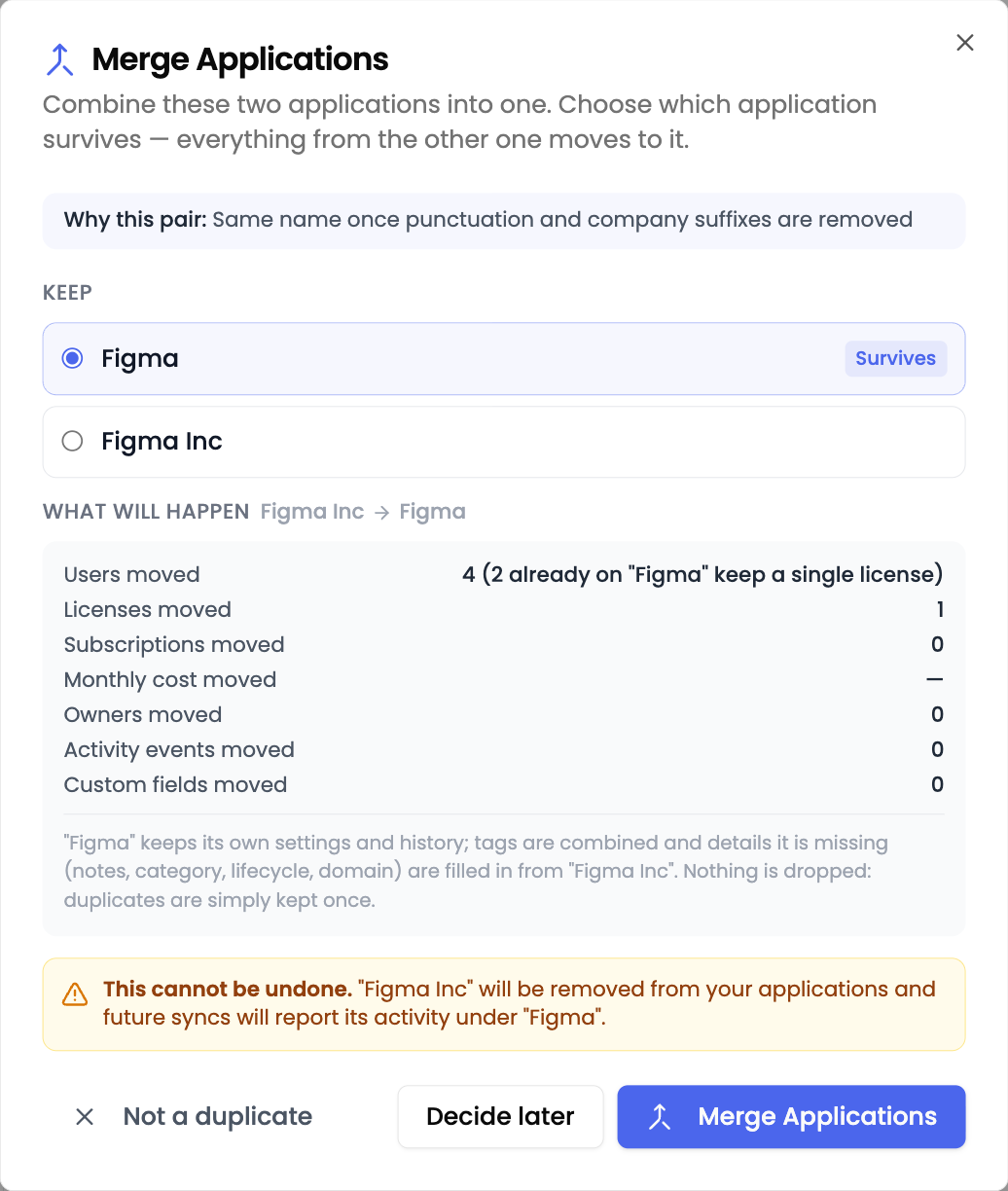
<figure><img src="https://1674559363-files.gitbook.io/~/files/v0/b/gitbook-x-prod.appspot.com/o/spaces%2FvSdGShklbloRzyUwwMzX%2Fuploads%2Fgit-blob-8425c6b781b3d8b9a3b1d01769166bbde7e89de9%2Fboza-changelog-2026-08-27-merge-duplicates.png?alt=media" alt="The Merge Applications dialog, showing which entry survives and what would move"><figcaption></figcaption></figure>

This release is about trusting what Boza shows you. Duplicate entries can be consolidated in a couple of clicks, an integration that stops feeding data now says so, and every subscription keeps a record of what it used to cost.

### Boza points out duplicate applications and vendors

The same tool arriving from an identity-provider sync, an invoice, and a manual entry ends up as two or three entries, and its cost is split across them. Boza now recognises those pairs and raises them at the top of your **Applications** and **Vendor Directory** lists.

* **Suggested, never automatic.** A pair is only flagged when the two names match once punctuation and company suffixes are removed, for example *Figma* and *Figma Inc*. Where the evidence is ambiguous Boza stays quiet, and a known domain that contradicts the pair vetoes it.
* **You see what moves before anything moves.** Review counts the users, licences, subscriptions, monthly cost, owners, activity, and custom fields that would transfer, and you choose which entry survives.
* **Vendors as well as applications.** Linked applications, payments, and spend move onto the vendor you keep. A payment already recorded on both sides is counted once rather than twice, and the preview says so.
* **The merge holds.** A later sync, licence import, or invoice attributes its data to the entry you kept instead of recreating the duplicate you removed.

You can also merge deliberately: select exactly two rows in **Applications** and choose **Merge**, whether or not Boza flagged them.

{% hint style="warning" %}
A merge cannot be undone. The entry you remove disappears from your inventory, and its history is reported under the entry you keep. Review the counts in the dialog before confirming.
{% endhint %}

**Why it matters:** a split inventory understates what a tool actually costs and inflates your application count. Consolidating a pair puts the whole story back on one record without losing anything.

[Merge duplicate applications →](/docs/inventory/applications.md#merge-duplicate-applications) · [Merge duplicate vendors →](/docs/inventory/vendors.md#merge-duplicate-vendors)

### You are told when an integration loses its connection

When an authorisation expires or is revoked, an integration stops feeding Boza without failing loudly. Your data quietly goes stale, and nobody finds out until someone notices a missing application weeks later.

* A banner on the **Integrations** page names the integration and the date the connection was lost, with a button to reconnect.
* A **Connection lost** badge marks the integration itself, so the state is visible where you manage it.
* Workspace administrators receive an email. An authorisation problem is reported immediately, a passing network error only after it repeats, and reminders are spaced out so a known problem never becomes a daily alert.
* Reconnect, and the banner and badge clear themselves on the next successful sync.

**Why it matters:** silence used to look exactly like success. Now a stalled connection is visible on the page, in the integration, and in your inbox.

<figure><img src="https://1674559363-files.gitbook.io/~/files/v0/b/gitbook-x-prod.appspot.com/o/spaces%2FvSdGShklbloRzyUwwMzX%2Fuploads%2Fgit-blob-c644390693538985ed2b4eec9df2de5a7f55b0da%2Fboza-changelog-2026-08-27-connection-lost.png?alt=media" alt="Banner reading: Atlassian Jira connection lost since Aug 26, 2026. Data is no longer syncing."><figcaption><p>A stalled integration says so, and offers the way back.</p></figcaption></figure>

[Manage your integrations →](/docs/integrations/integrations.md)

### Every subscription keeps its price history

Updating a subscription no longer overwrites what it used to cost. Boza closes the previous period and opens a new one, so a price change is recorded rather than lost.

* Open **Price history** from the row menu on **Subscriptions**, or on an application's **Costs** tab, for a read-only timeline, newest first, with the current period marked.
* Each period shows its seats, unit price, monthly total, and the dates it applied.
* The panel covers recorded subscription prices, which is what your cost estimates are built from. No invoice or payment appears in it.

**Why it matters:** when a renewal changes your seat count or unit price, the previous terms stay on the record instead of being replaced.

[Review subscriptions →](/docs/inventory/subscriptions-and-vendors/reviewing-subscriptions.md)

### Your capability map and data inventory describe the estate you approved

The **Mapping** and **Data** pages used to include every tracked application, which on a workspace connected to an identity provider means the entire Shadow IT tail. Both now describe approved applications only.

* Capabilities hold the tools you sanctioned rather than every account anyone has signed into.
* Your data inventory covers sanctioned systems, which is what a DPO or an auditor expects to see.
* Nothing is deleted. Placements are hidden, so an application that regains approval returns exactly where it was.

[Business Capability Map →](/docs/platform/mapping.md) · [Data inventory →](/docs/inventory/data.md)

### Smaller improvements

* **Quieter renewal alerts.** A subscription that renews by itself every month no longer produces a monthly notification. Renewals that genuinely need a decision still reach you.
* **Errors that explain themselves.** When an approval or an update is refused, Boza now gives the reason instead of reporting a generic failure.

***

## August 14, 2026 — One cost vocabulary, a data inventory, and your capability map

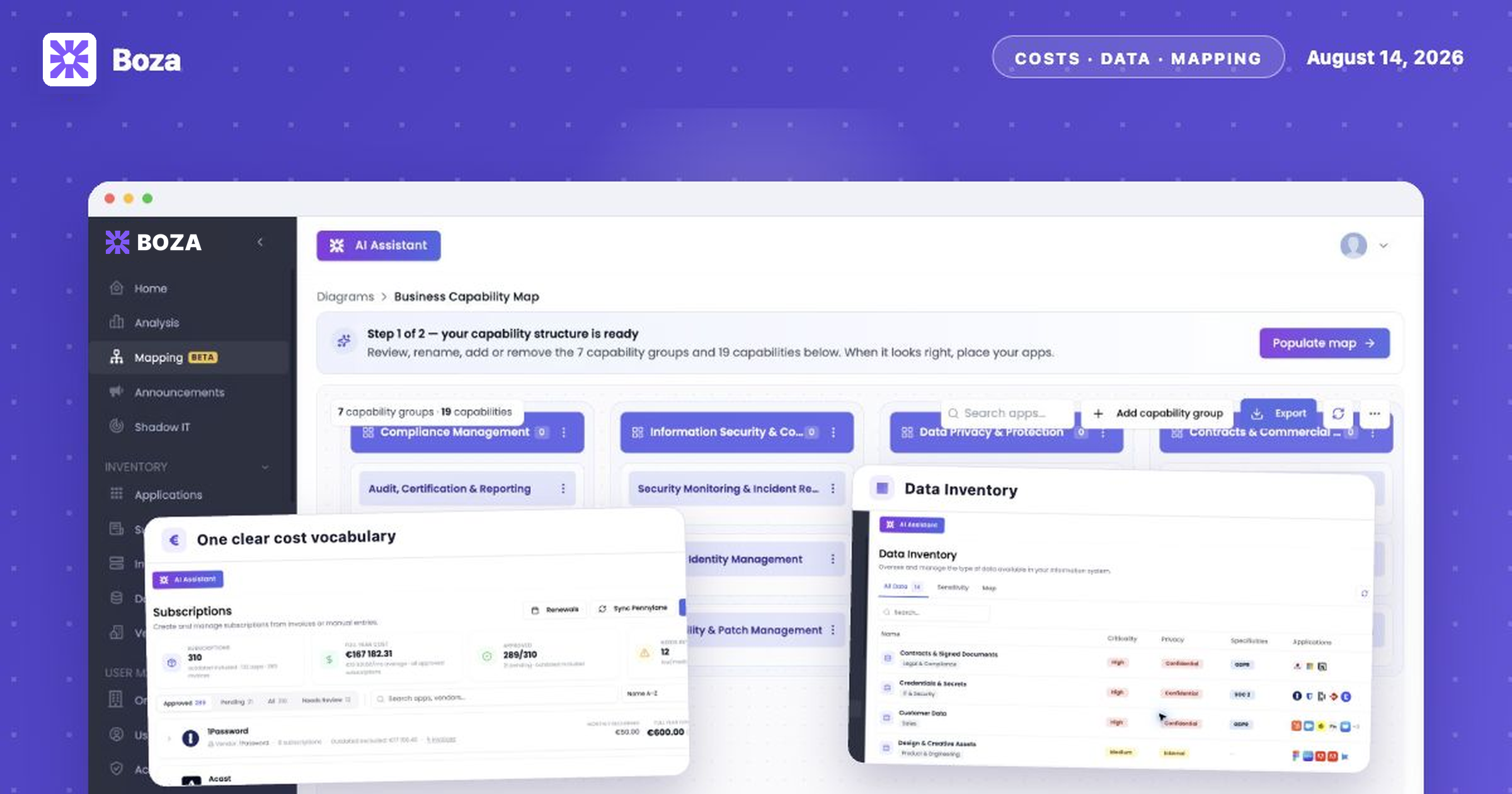
<figure><img src="https://1674559363-files.gitbook.io/~/files/v0/b/gitbook-x-prod.appspot.com/o/spaces%2FvSdGShklbloRzyUwwMzX%2Fuploads%2Fgit-blob-9e72f5dae553df29ec5990eb815b3774cbf9f6a1%2Fboza-changelog-2026-08-14-cost-data-mapping.png?alt=media" alt="Illustration of Boza cost metrics, Data Inventory, and the Business Capability Map"><figcaption></figcaption></figure>

This release gives every cost figure in Boza a single meaning and a stated period, adds two new Beta pages for data governance and application mapping, and rebuilds the filter panel that every list shares.

### Costs now say what they mean

Applications, subscriptions, vendors, users, and teams now draw their cost figures from one shared set of names. Every amount states the window it covers, and you can check how it was worked out without leaving the page.

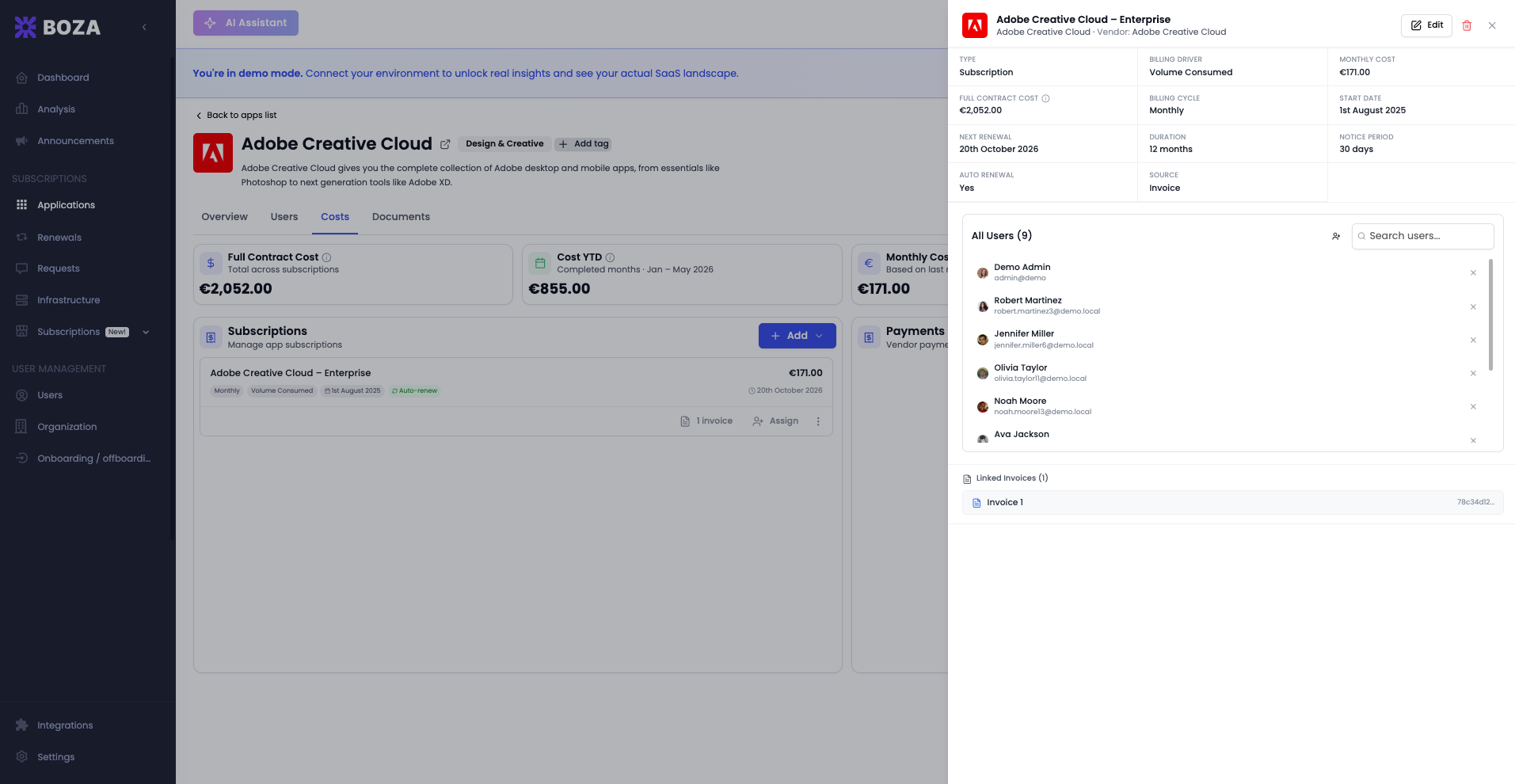
**“Full Contract Cost” is now “Full year cost.”** The old figure multiplied a subscription's monthly price by its contract length, so a three-year deal reported three years of spend beside a **Cost YTD** covering only a few months. **Full year cost** is twelve months at the subscription's current price — an annual run rate you can compare between applications whatever their term.

The canonical set of names:

| Name                    | What it is                                                                                           |
| ----------------------- | ---------------------------------------------------------------------------------------------------- |
| **Full year cost**      | Active recurring monthly cost × 12 months                                                            |
| **Monthly cost**        | Full year cost ÷ 12 — an average month, not the last bill                                            |
| **Cost YTD**            | Current recurring monthly cost × the completed months of this year                                   |
| **Last month cost**     | The last completed month                                                                             |
| **Wasted costs**        | Estimated cost of seats nobody used during completed months                                          |
| **Total over the term** | What a whole signed contract costs, labelled with its own length, for example *Total over 36 months* |
| **Term**                | The contract length itself                                                                           |
| **One-time**            | A charge billed once, never multiplied into a yearly total                                           |

**Full year cost** deliberately leaves out one-time subscriptions, outdated (expired) subscriptions, contracts whose term has not started, and standalone discount rows. Where a card excludes something, it now names what it left out.

Payments and subscription cost are kept apart. Every screen showing payments carries the same note: payments come from approved invoices and imported transactions, an approved invoice may still be unpaid, and subscription cost is an estimate from your saved prices — so the two totals do not have to match.

{% hint style="warning" %}
Nothing changed in your subscriptions or invoices. Only the naming, and the calculation basis of that one yearly figure, changed. An application whose subscriptions are all one-time now shows a dash instead of an amount, because a one-off charge has no annual run rate.
{% endhint %}

Where you will notice it:

* **Applications** shows **Full year cost** and **Cost YTD** columns.
* **Subscriptions** labels each application row *Monthly recurring*, *Total over the term* (only when its length makes it differ), and *Full year cost*. Its cost KPI card is now **Full year cost** and reflects the filters you have applied.
* The **Vendor Directory** replaces Current Month, Current Year, and Total Spend with **Full year cost** and **Cost YTD**, calculated from subscriptions like everywhere else, so a vendor and its applications agree.
* **Users**, **Teams**, and **Organization** lead with **Full year cost**, and the rows now add up to the total above them.
* The **Dashboard** card previously called *Estimated Current Year Costs* is now **Cost YTD**.
* The **Teams → Apps** table no longer carries a Full Contract Cost column; its header named a contract cost while the cell showed year-to-date spend.
* **Entity** is now called **Organization** everywhere it faces you, filters included.

**How to use it:** hover the information icon beside any amount to see its period and definition. On an application's **Costs** tab, click **How calculated** on a card to see the sum with your own figures — for example `€4,680.40 × 12 months = €56,164.80`.

**Why it matters:** a yearly figure and a year-to-date figure on the same row now cover comparable ground, so finance and IT can reconcile an invoice against Boza instead of explaining the difference.

<figure><img src="https://1674559363-files.gitbook.io/~/files/v0/b/gitbook-x-prod.appspot.com/o/spaces%2FvSdGShklbloRzyUwwMzX%2Fuploads%2Fgit-blob-ec283241e68bc8c8c322d2febbedc4e0ff2a479e%2Fboza-changelog-2026-08-14-costs.png?alt=media" alt="Subscriptions page showing Full year cost, Monthly recurring, and excluded outdated costs"><figcaption><p>Cost figures now carry a consistent name and period across the portfolio.</p></figcaption></figure>

[Read the cost metric definitions →](/docs/resources/metrics-and-data-freshness.md#cost-metrics) · [Cost Analysis →](/docs/platform/analysis/cost.md)

### Build a data inventory for GDPR and NIS2 (Beta)

**Data** is a new page under **Inventory** where workspace administrators record the kinds of data the organization holds and the applications that hold them.

Boza builds it in two steps:

1. Answer a short questionnaire about the areas of your business that handle data, where data lives outside your applications, how it moves in and out, special categories you handle, and the frameworks that apply to you. You can attach documents such as a record of processing or an organization chart. Boza drafts the **structure** — a list of named data types, with no applications attached.
2. Review, rename, add, or remove those data types, then click **Populate data** to link your tracked applications to them. The linking runs in the background; you can keep working while it fills in.

Each data type records a name, category, criticality, privacy level, a description, specificities such as GDPR or SOC 2, a responsible person, and its applications.

Three tabs read the same list:

* **All Data** — the full table, with search and filters on criticality, privacy, and specificity.
* **Sensitivity** — confidential, personal, and regulated data grouped, with cards that also filter the view.
* **Map** — a data-type × application matrix.

<figure><img src="https://1674559363-files.gitbook.io/~/files/v0/b/gitbook-x-prod.appspot.com/o/spaces%2FvSdGShklbloRzyUwwMzX%2Fuploads%2Fgit-blob-172860c8851c4eafd7c69e259a7080986b99d7e2%2Fboza-changelog-2026-08-14-data-inventory.png?alt=media" alt="Data Inventory table with criticality, privacy, specificity, and application columns"><figcaption><p>Data Inventory connects named data types to the applications that hold them.</p></figcaption></figure>

You can also add or edit a data type by hand at any time, assign applications to it in bulk, and open **Update data list** (refresh icon) to refine the list with an instruction in your own words — or start the questionnaire over.

**Why it matters:** a record of processing and a NIS2 asset inventory both start with knowing which data you hold and where it sits. This keeps that answer beside the application inventory it depends on.

**Requirements:** workspace Admin. Populating links only applications Boza already tracks.

{% hint style="info" %}
Data is a Beta feature. AI-drafted data types are a starting point for review, not a compliance record. Confirm each one before using the inventory as evidence.
{% endhint %}

[Build your data inventory →](/docs/inventory/data.md)

### Map your applications to your business capabilities (Beta)

**Mapping → Business Capability Map** shows which parts of your business each application supports.

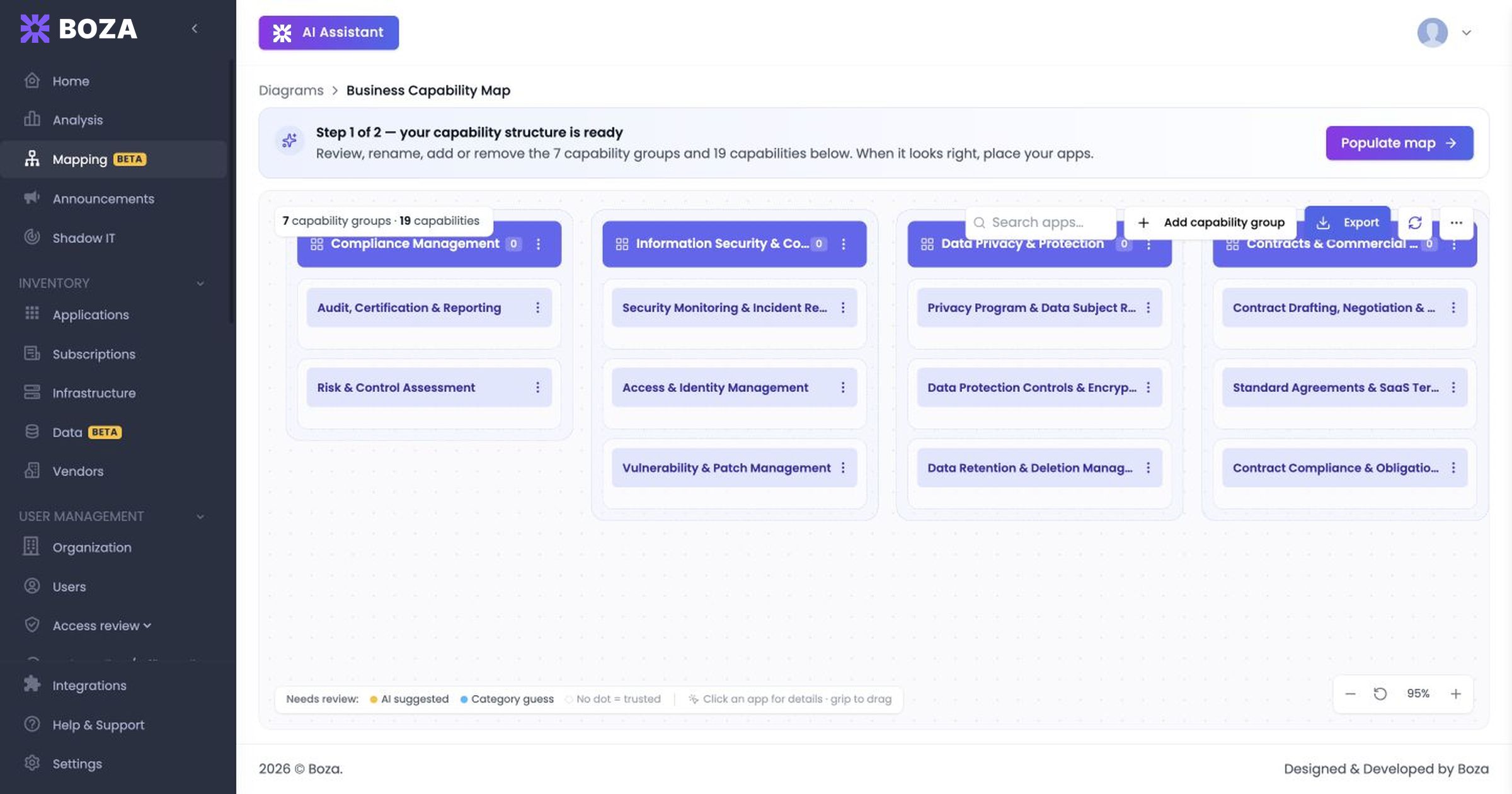
As with the data inventory, generation happens in two confirmed steps. A short questionnaire about your industry, business model, company size, main business functions, and compliance frameworks produces a **capability structure** — groups and capabilities, no applications yet. Review and edit that structure, then choose **Populate map** to place your tracked applications onto it. You choose whether to place every application, best guess included, or only confident matches, and you can add a note about anything unusual in how your team uses its tools.

<figure><img src="https://1674559363-files.gitbook.io/~/files/v0/b/gitbook-x-prod.appspot.com/o/spaces%2FvSdGShklbloRzyUwwMzX%2Fuploads%2Fgit-blob-7cd9d5999d295700ac34cfd69cbacb05e142423c%2Fboza-changelog-2026-08-14-capability-map.png?alt=media" alt="Business Capability Map structure ready for review before applications are populated"><figcaption><p>Review the generated capability structure before placing applications on the map.</p></figcaption></figure>

Once the map exists you can:

* Drag an application from one capability to another, add applications to a capability, or remove a placement. Applications that are not placed sit in an **Unmapped** column with an **Auto-map** action.
* Open an application to see why it was placed there — the source of the placement, its confidence, and the features behind it.
* Confirm placements one at a time or in bulk, and work through a review queue that puts the most important uncertain placements first.
* Refine the structure incrementally: **Refine your map** takes one instruction such as *Split Finance into Accounting and Treasury* and applies only that, keeping everything else.
* Highlight business-critical applications without enforced SSO or MFA, or applications renewing soon.
* Export the map as PDF or CSV.

Applications also gain an **Architecture** tab. Tick the features your team actually uses and the application appears in the matching business areas on the map; the tab also shows where the application runs and the data it touches.

**Why it matters:** the portfolio stops being a flat list. You can see which parts of the business are covered by several tools, and which are covered by none.

**Requirements:** workspace Admin. Only tracked applications can be placed on the map.

{% hint style="info" %}
The Business Capability Map is a Beta feature. Generated structures and placements are drafts for you to confirm. The other diagram types on the Mapping page are marked **Coming soon** and are not available yet.
{% endhint %}

<figure><img src="https://1674559363-files.gitbook.io/~/files/v0/b/gitbook-x-prod.appspot.com/o/spaces%2FvSdGShklbloRzyUwwMzX%2Fuploads%2Fgit-blob-b5580c1fdaaa85cf39fef34d0b9721d3954b6ebf%2Fboza-changelog-2026-08-14-mapping-diagrams.png?alt=media" alt="Mapping page showing the Business Capability Map and diagram types marked Coming soon"><figcaption><p>The Business Capability Map is available in Beta; the other diagram types remain clearly marked as in development.</p></figcaption></figure>

[Explore the Business Capability Map →](/docs/platform/mapping.md)

### More filters, in a filter panel you can search

The filter panel shared by Applications, Subscriptions, Users, Analysis, and Data has been rebuilt around a two-pane layout: find a filter by name on the left, choose its values on the right, each with its own search box.

<figure><img src="https://1674559363-files.gitbook.io/~/files/v0/b/gitbook-x-prod.appspot.com/o/spaces%2FvSdGShklbloRzyUwwMzX%2Fuploads%2Fgit-blob-46bf61dc092d046de0ab18dd4ca039a0ec41b1d9%2Fboza-changelog-2026-08-14-filter-panel.png?alt=media" alt="Two-pane filter panel with filter names on the left and criticality options on the right"><figcaption><p>The shared panel separates finding a filter from searching its available options.</p></figcaption></figure>

* The **Filter** button carries a count of what is active, the first active filters appear as chips you can clear individually, and **Clear all** resets the panel.
* Long option lists — such as an application category list with a hundred entries — now scroll instead of being cut off.
* On a narrow screen the panel opens the list first and the options second.

New filters in this release:

* **Group** — the groups synchronized from Google Workspace or Microsoft Entra ID. Available on Applications, Users, an application's Users tab, the Add Users dialog, the Analysis Cost and Usage tabs, and approved subscriptions.
* **Custom Field** — filter by the values recorded in your own custom fields. Pick a field, then its values; values within one field are combined with OR, separate fields with AND, and **Not Provided** finds applications where the field is empty. Available on Applications and on the Analysis Cost and Usage tabs, and applied to the Applications CSV export.
* **Subscriptions filters** — grouped as *Assigned users* (Organization, Team, Group, and whether a subscription has assigned users), *Subscription details* (billing cycle, pricing model, created from manual entry or an invoice, and type), and *Renewal* (active, outdated, renewing within 90 days, auto-renew enabled).

Selections are kept in the page address, so a reload or a shared link restores the same view.

**Why it matters:** large inventories can be narrowed to the exact population you need to review, and the CSV export matches what the table shows.

[Filter and manage applications →](/docs/inventory/applications.md)

### Create subscriptions for several applications at once

**Subscriptions** now has a **Create subscription** button that offers two routes: create from invoices, or create manually.

The manual route is a three-step flow — choose the applications, enter each subscription's details, then review everything before saving. You can add an application to the selection from the catalog or as a custom entry without leaving the flow.

[Manage subscriptions and contract types →](/docs/inventory/subscriptions-and-vendors.md)

### Keep your Boza AI conversations

Boza AI conversations are now stored in your workspace instead of a single thread in the browser. A sidebar lists your previous conversations grouped by date, with search, rename, delete, and **New conversation**. Your existing local thread is carried over the first time you open the assistant.

[Use the Boza AI Assistant responsibly →](/docs/platform/ai-assistant.md)

### Improvements

* Access reviews are no longer marked Beta.
* **Add New App** has been rebuilt as a two-pane wizard: browse the catalog by category on the left, follow the steps for the selected application on the right, and confirm the result before adding another.
* The application owners dialog is now organized by ownership role.
* The Analysis **Most expensive apps (YTD)** card ranks on the server, so it matches the Cost YTD figure it displays and follows the page's Organization and Team selection. A failed request now shows an error with a retry instead of looking like a workspace with no costs.
* Automatic renewals catch up every missed cycle in one pass rather than one day at a time, keep a month-end contract on its original date, and no longer stop the whole renewal run when a single subscription fails.
* Invoice imports handle long documents more reliably and explain why a document produced no line items instead of failing silently.
* The application catalog is re-enriched on a schedule, including applications created from an invoice or by hand, and logos are checked before they are stored so a missing logo falls back to initials rather than a blank box.
* Disconnecting **Google Workspace** or the **Slack bot** now also revokes Boza's token with the provider, not just in Boza.

***

## July 22, 2026 — Entity filters, privacy controls, and smoother daily work

<figure><img src="https://1674559363-files.gitbook.io/~/files/v0/b/gitbook-x-prod.appspot.com/o/spaces%2FvSdGShklbloRzyUwwMzX%2Fuploads%2Fgit-blob-7b42deb59777b0b8d07041c06f5a09ed45e14e48%2Fboza-changelog-2026-07-22-entity-filters.png?alt=media" alt="Illustration: filtering the application list by entity, with browser-level privacy controls"><figcaption></figcaption></figure>

This release helps administrators focus large inventories, make a browser-level choice about product analytics, and work more reliably in larger workspaces.

### Filter applications by entity

The Applications page now includes **Entity** alongside the existing team, owner, compliance, lifecycle, and attention filters.

* Combine several filters to isolate the exact application population you need.
* Export the filtered view instead of cleaning a full inventory after download.
* Use entity and team together to prepare a scoped governance or cost review.

**Why it matters:** multi-entity workspaces can review the right portfolio without maintaining separate spreadsheets.

<figure><img src="https://1674559363-files.gitbook.io/~/files/v0/b/gitbook-x-prod.appspot.com/o/spaces%2FvSdGShklbloRzyUwwMzX%2Fuploads%2Fgit-blob-2d3b0f374bc00ef00f3e98f83b6237309962a5d0%2Fboza-application-filters.png?alt=media" alt="Boza Applications page with the Entity filter open"><figcaption><p>Combine Entity with ownership, team, lifecycle, and compliance filters.</p></figcaption></figure>

[Learn how to filter and manage applications →](/docs/inventory/applications.md)

### Choose whether this browser sends product analytics

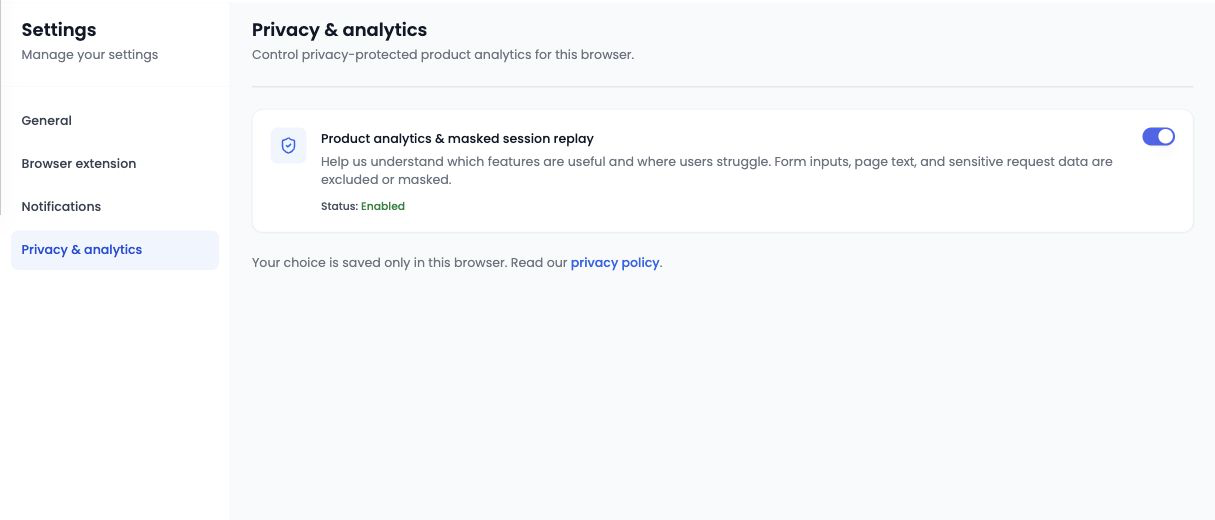
Workspace administrators can open **Settings → Privacy & Analytics** to allow or stop product analytics and masked session replay in the current browser profile.

* The control takes effect in the browser where you change it.
* Repeat the choice in another browser or profile if you use more than one.
* An unavailable state means analytics is not configured in the current environment.

**Why it matters:** the setting is visible and controllable without a support request, while its browser-local scope remains explicit.

<figure><img src="https://1674559363-files.gitbook.io/~/files/v0/b/gitbook-x-prod.appspot.com/o/spaces%2FvSdGShklbloRzyUwwMzX%2Fuploads%2Fgit-blob-0010fa449eecaa647089a6a241a9a8b823062255%2Fboza-settings-privacy-analytics.png?alt=media" alt="Privacy and Analytics controls in Boza Settings"><figcaption><p>The analytics preference applies to the current browser profile.</p></figcaption></figure>

[Understand Privacy & Analytics settings →](/docs/settings-and-security/settings.md#privacy-and-analytics)

### Improvements

* Application and user queries have been optimized to reduce slowdowns in larger workspaces.
* Daily and monthly synchronization jobs now run independently for better resilience.
* Static-asset handling has been improved so the latest interface loads reliably after a release.
* More consistent date formatting across the interface.

***

## July 6, 2026 — Access Reviews from schedule to audit evidence

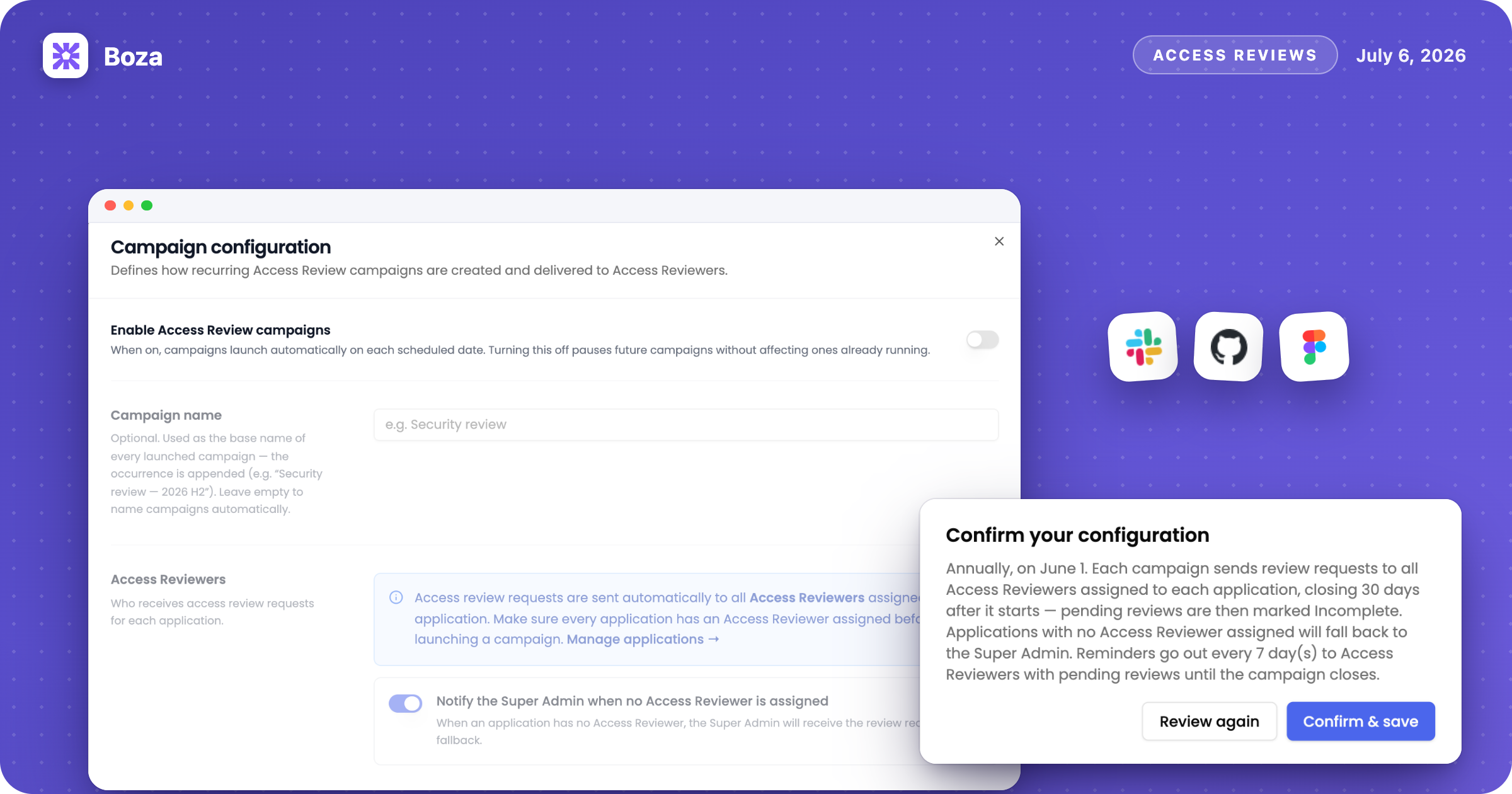
<figure><img src="https://1674559363-files.gitbook.io/~/files/v0/b/gitbook-x-prod.appspot.com/o/spaces%2FvSdGShklbloRzyUwwMzX%2Fuploads%2Fgit-blob-07fdcee06e235dcfdca14188e2c8a2ffa7475a30%2Fboza-changelog-2026-07-06-access-reviews.png?alt=media" alt="Illustration: configuring a recurring Access Review campaign and confirming reviews"><figcaption></figcaption></figure>

Boza now gives workspace administrators a complete workflow for asking application reviewers to confirm the access they manage.

### Run recurring Access Review campaigns

Boza can coordinate annual or twice-yearly access certifications from campaign setup through evidence export.

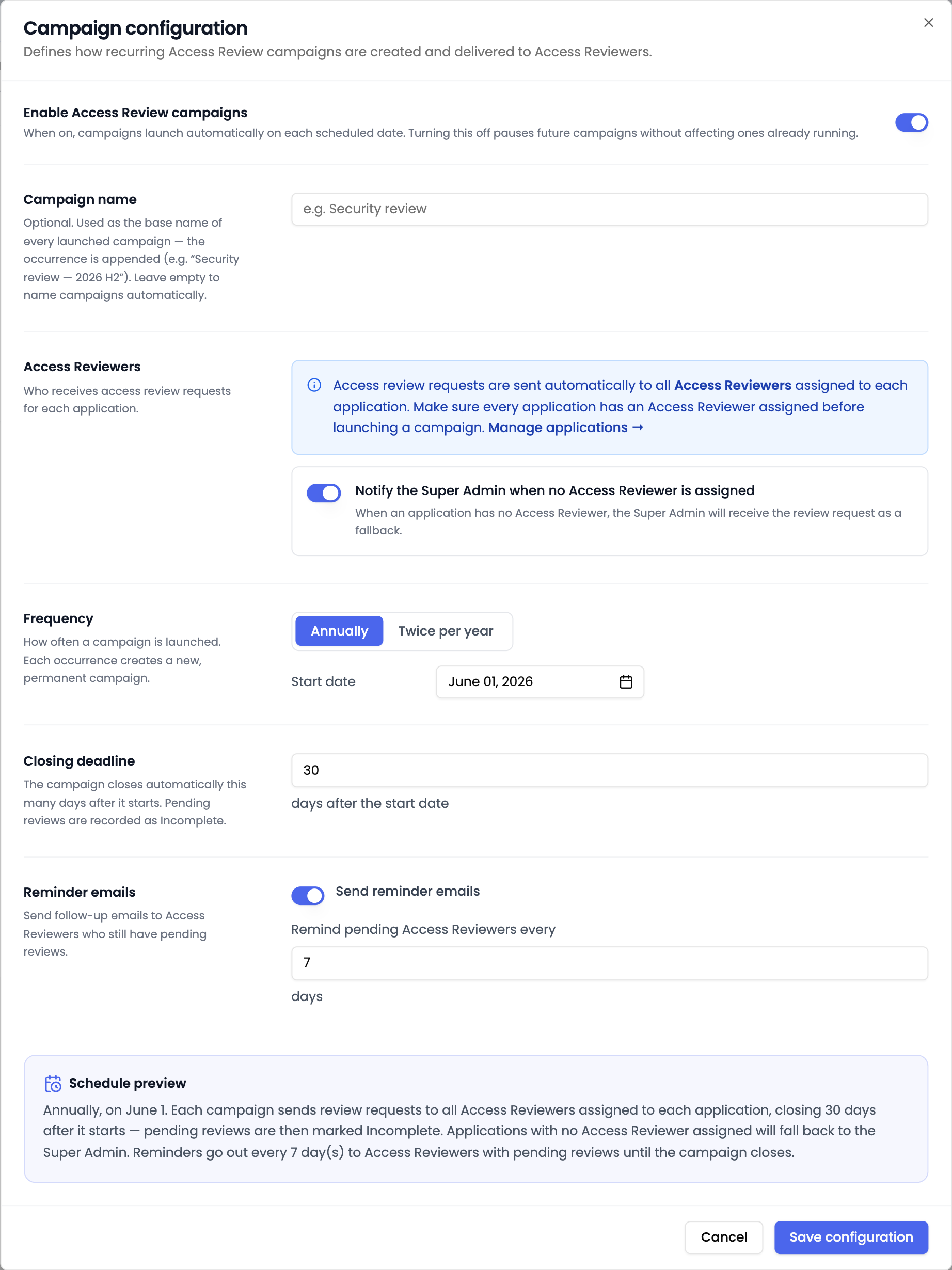
* Choose each campaign's start date, deadline, and reminder frequency.
* Include the applications currently marked **Approved**.
* Send a review to every assigned **Access Reviewer**.
* Optionally use the application's **Super Admin** when no Access Reviewer is assigned.
* Launch the next campaign immediately instead of waiting for its scheduled date.
* Track completed, pending, incomplete, and not-covered review records.

Boza takes a snapshot of the relevant application and reviewer names when a campaign launches, preserving that context even if ownership changes later.

**Why it matters:** application owners and reviewers work from one shared campaign, while administrators retain a consistent audit record.

<figure><img src="https://1674559363-files.gitbook.io/~/files/v0/b/gitbook-x-prod.appspot.com/o/spaces%2FvSdGShklbloRzyUwwMzX%2Fuploads%2Fgit-blob-b7d262a8b865f409e6c0708c69ee0e97aae2dc74%2Fboza-access-review-configuration.png?alt=media" alt="Recurring Access Review campaign configuration"><figcaption><p>Configure the campaign frequency, reviewers, fallback, closing deadline, and reminder schedule in one place.</p></figcaption></figure>

### Test the reviewer experience before launch

Before starting a live campaign, administrators can send a clearly labelled test review.

* Select no more than two approved applications for the test.
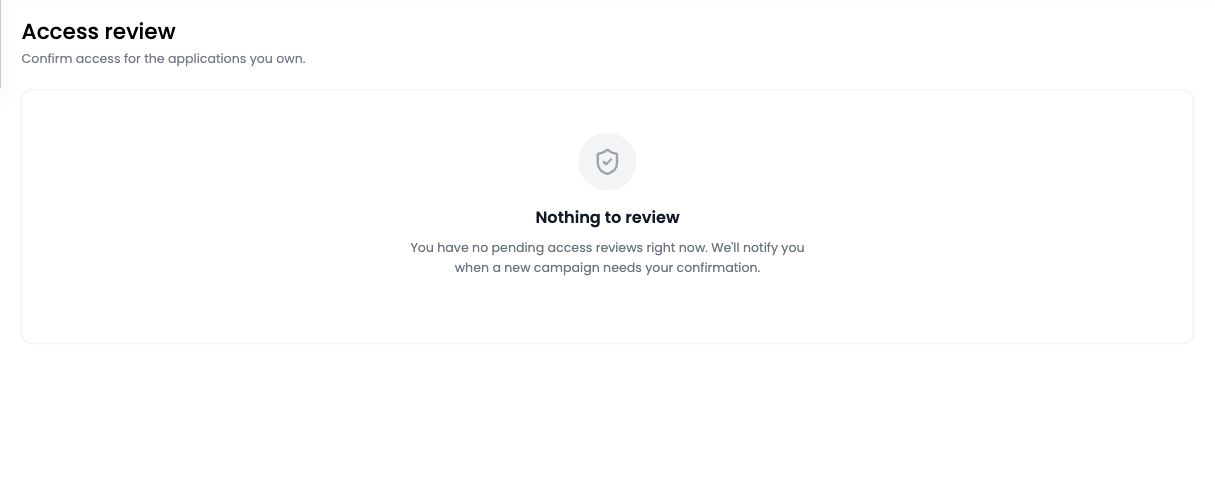
* Open the emailed test directly in **My Reviews**.
* Preview the same confirmation and optional-comment workflow that reviewers receive.
* Validate reviewer assignments, delivery, and instructions without adding the result to audit evidence.

<figure><img src="https://1674559363-files.gitbook.io/~/files/v0/b/gitbook-x-prod.appspot.com/o/spaces%2FvSdGShklbloRzyUwwMzX%2Fuploads%2Fgit-blob-1f2bdae044bd85a6ab3ca6d2cd5fc2d2a6f1fd9c%2Fboza-access-review-my-reviews.png?alt=media" alt="Access Reviewer My Reviews page"><figcaption><p>Reviewers confirm their assigned applications, add optional context, and keep previous campaign history in view.</p></figcaption></figure>

### Monitor and preserve the campaign record

Administrators can follow progress, send reminders, investigate incomplete or uncovered reviews, and export a non-cancelled campaign to CSV.

{% hint style="info" %}
Deleting the upcoming scheduled campaign turns off the recurring schedule until it is configured again. Cancelling a running campaign keeps the record visible for traceability, but a cancelled campaign cannot be exported.
{% endhint %}

[Configure an Access Review campaign →](/docs/user-management/access-reviews/configure-campaigns.md) · [Complete a review →](/docs/user-management/access-reviews/complete-a-review.md)

***

## June 25, 2026 — A dedicated workspace for Shadow IT

<figure><img src="https://1674559363-files.gitbook.io/~/files/v0/b/gitbook-x-prod.appspot.com/o/spaces%2FvSdGShklbloRzyUwwMzX%2Fuploads%2Fgit-blob-bfd86823d4b081a7200f888a59da49bd50a59be0%2Fboza-changelog-2026-06-25-shadow-it.png?alt=media" alt="Illustration: triaging newly discovered applications in the Shadow IT queue"><figcaption></figcaption></figure>

New application discoveries now have their own operational queue, supported by clearer inventory tables and extension-deployment choices.

### Triage newly discovered applications in Shadow IT

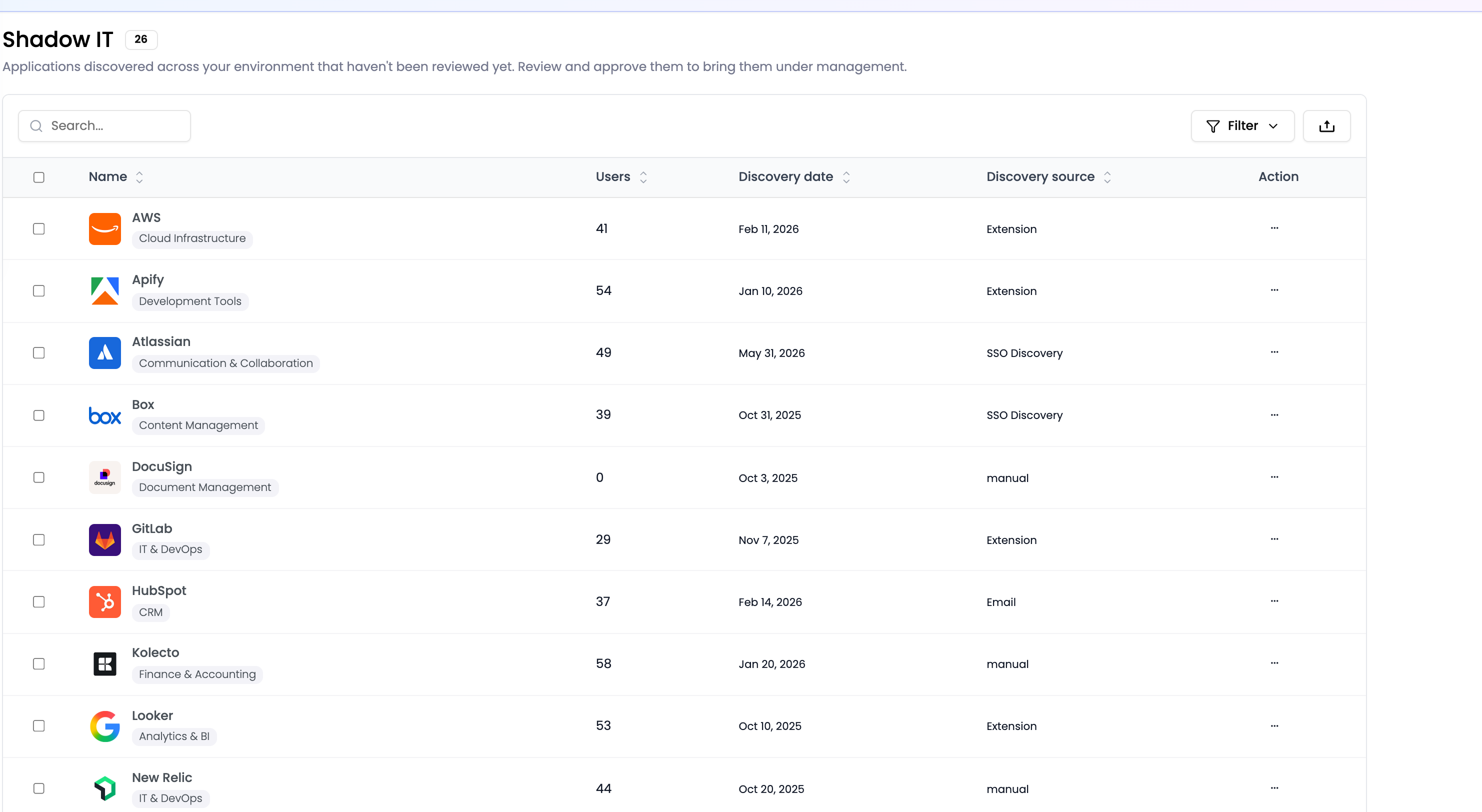
New discoveries now have a dedicated **Shadow IT** page instead of sharing the main application tabs.

* See the application, discovery source, category or hosting information, and associated user count.
* Search, sort, filter, select, and export the discovery backlog.
* Approve legitimate applications, mark them unapproved, keep monitoring them, or remove a false positive.
* Control approval and activity tracking independently.
* Keep **My Apps** focused on approved applications and those still under review.

**Why it matters:** discovery becomes an operational queue instead of background noise in the managed application inventory.

<figure><img src="https://1674559363-files.gitbook.io/~/files/v0/b/gitbook-x-prod.appspot.com/o/spaces%2FvSdGShklbloRzyUwwMzX%2Fuploads%2Fgit-blob-9eef1e3c372225a0d9385b962d0d29205b2ecc62%2Fboza-shadow-it.png?alt=media" alt="The Shadow IT application discovery queue in Boza"><figcaption><p>Review newly discovered applications separately from the managed inventory.</p></figcaption></figure>

{% hint style="warning" %}
A discovery signal shows that Boza matched an application or domain. It does not by itself establish whether a visit or sign-in was professional or personal; an administrator still needs to review the context.
{% endhint %}

[Build a weekly Shadow IT triage routine →](/docs/inventory/shadow-it.md)

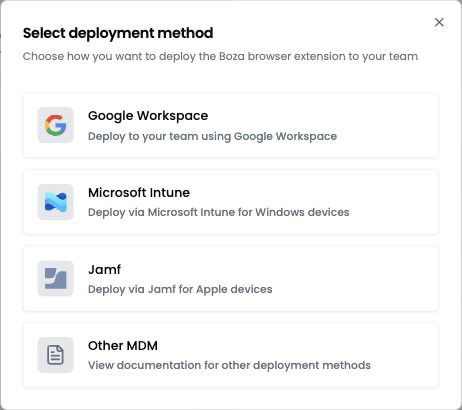
### See clearer browser-extension deployment choices

The extension area now separates:

* **Activity Monitoring** — deployment state, recent activity, and data-collection controls for users.
* **Applications Display** — which applications are visible or hidden in the extension.
* **Deployment methods** — guided entry points for Google Workspace, Microsoft Intune, Jamf, and other device-management approaches.

**Why it matters:** administrators can distinguish device coverage from application visibility and choose the deployment path that fits their fleet.

<figure><img src="https://1674559363-files.gitbook.io/~/files/v0/b/gitbook-x-prod.appspot.com/o/spaces%2FvSdGShklbloRzyUwwMzX%2Fuploads%2Fgit-blob-2b11db7602adb32f0f767cb956625179ee55160a%2Fboza-extension-deployment-methods.png?alt=media" alt="Browser extension deployment choices in Boza Settings"><figcaption><p>Choose the supported deployment route for your managed environment.</p></figcaption></figure>

[Choose a browser-extension deployment method →](/docs/browser-extension/deployment.md)

### Improvements

* Broader column sorting in application and user tables.
* Keyboard-accessible application rows.
* Clearer application-logo fallbacks.
* More consistent display of user names.

***

## June 11, 2026 — Ask Boza AI about your SaaS portfolio

<figure><img src="https://1674559363-files.gitbook.io/~/files/v0/b/gitbook-x-prod.appspot.com/o/spaces%2FvSdGShklbloRzyUwwMzX%2Fuploads%2Fgit-blob-40532712fc3e0847f0a36824b1344b9c1b555f58%2Fboza-changelog-2026-06-11-ai-assistant.png?alt=media" alt="Illustration: asking the Boza AI Assistant which subscriptions renew soon"><figcaption></figcaption></figure>

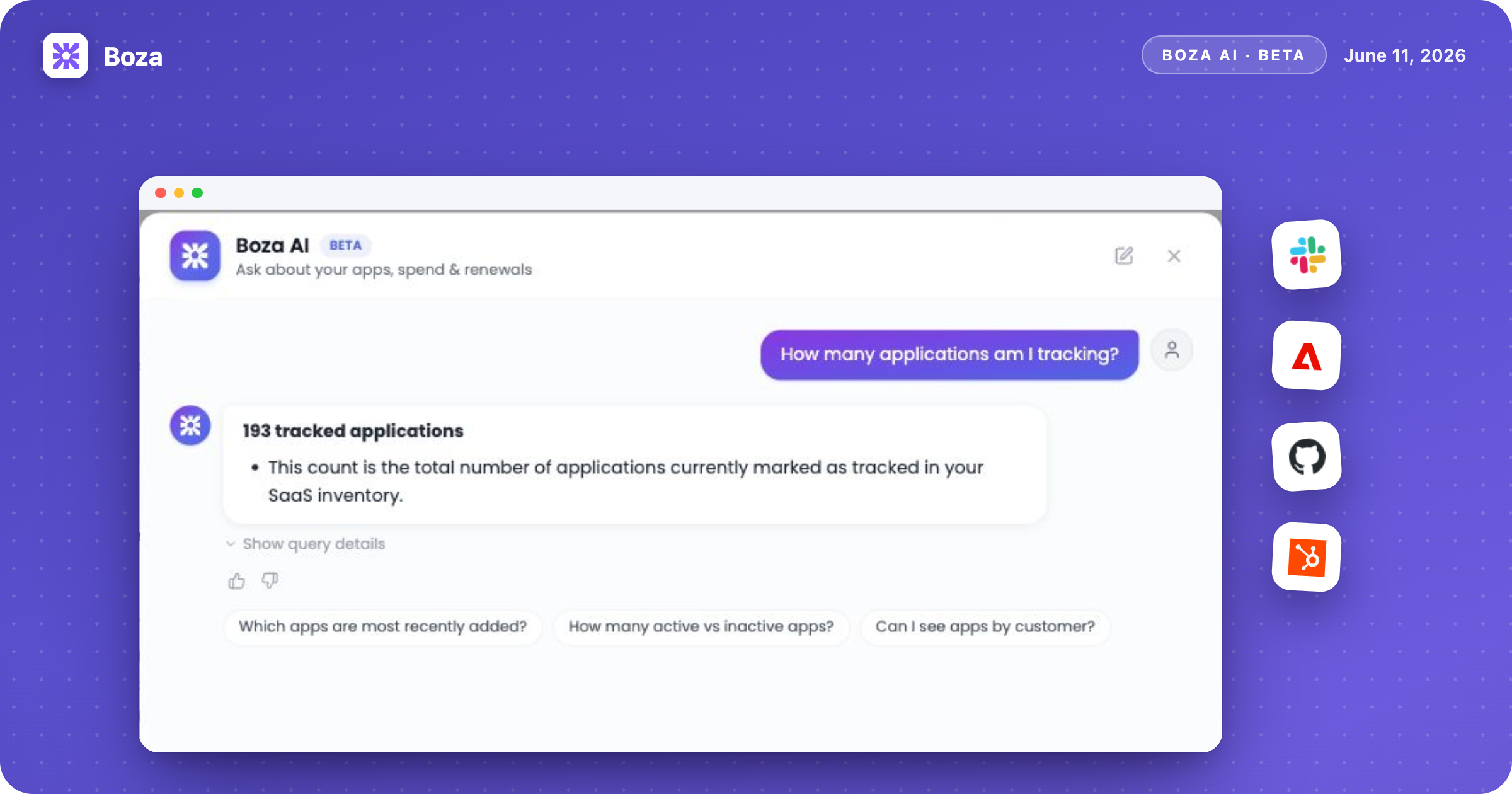
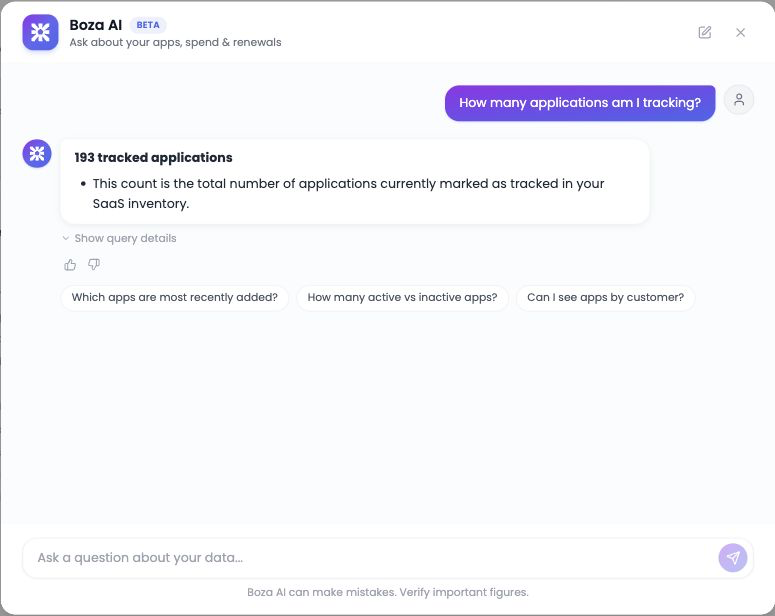
### Ask questions in natural language

The **Boza AI Assistant (Beta)** can answer read-only questions about applications, usage, spend, subscriptions, and renewals using data from the current organization.

Examples include:

* “Which subscriptions renew in the next 90 days?”
* “What is our total monthly SaaS spend?”
* “Which approved applications have no Super Admin?”
* “Compare our SaaS spend this year with last year.”

Use suggested follow-ups to narrow a result without rebuilding a report from the beginning.

### Move from an answer to evidence

* Inspect generated query details when you need to understand the answer.
* View compatible results of roughly 2–60 rows as a chart.
* Ask explicitly for an export or download when you need a CSV of the returned result.
* Give thumbs-up or thumbs-down feedback on the latest answer.

The assistant cannot approve applications, change subscriptions, assign users, or launch workflows. Important financial, compliance, and audit figures should still be checked against the relevant Boza page or export.

**Why it matters:** common analysis no longer has to begin with a manual export, but the source data and verification workflow remain visible.

<figure><img src="https://1674559363-files.gitbook.io/~/files/v0/b/gitbook-x-prod.appspot.com/o/spaces%2FvSdGShklbloRzyUwwMzX%2Fuploads%2Fgit-blob-135728d072c25b81ccbcb5d2163226a9ed4e25fc%2Fboza-ai-assistant-answer.png?alt=media" alt="A read-only answer and follow-up suggestions in the Boza AI Assistant"><figcaption><p>Ask a focused question, inspect the answer, and continue with a more specific follow-up.</p></figcaption></figure>

{% hint style="warning" %}
Boza AI is in Beta and can return incomplete or incorrect answers. In the current release, signed-in users who can open the assistant can query organization-wide data; application ownership, team, and Access Reviewer assignments do not narrow its results.
{% endhint %}

[Use the Boza AI Assistant responsibly →](/docs/platform/ai-assistant.md)

***

## May 2026 — A stronger subscription and invoice workflow

<figure><img src="https://1674559363-files.gitbook.io/~/files/v0/b/gitbook-x-prod.appspot.com/o/spaces%2FvSdGShklbloRzyUwwMzX%2Fuploads%2Fgit-blob-78558eb7b8e06dd7bedc89725825f70b0bff44ab%2Fboza-changelog-2026-05-subscriptions.png?alt=media" alt="Illustration: subscription contract details and the invoice review queue"><figcaption></figcaption></figure>

May brought subscription maintenance, invoice review, and finance notifications closer together.

### Maintain the complete contract from an application

Subscription records now support more of the commercial context needed for day-to-day management.

* Edit and renew a subscription from its application.
* Assign multiple licenses to the same user for one application when needed.
* Distinguish a software **Subscription** from a professional **Service**.
* Record billing driver, contract duration, notice period, and renewal behavior.
* Compare year-to-date cost with the full contract commitment.

**Why it matters:** procurement and application owners can discuss the same commercial record without reducing every charge to a seat subscription.

<figure><img src="https://1674559363-files.gitbook.io/~/files/v0/b/gitbook-x-prod.appspot.com/o/spaces%2FvSdGShklbloRzyUwwMzX%2Fuploads%2Fgit-blob-e2ed5aa97a96f6822de71ad7dea6bc48978ca425%2Fboza-subscription-detail.png?alt=media" alt="Subscription details in Boza"><figcaption><p>Review contract dates, billing details, renewal settings, and linked invoices in context.</p></figcaption></figure>

[Manage subscriptions and contract types →](/docs/inventory/subscriptions-and-vendors.md)

### Review AI-detected invoice items before they become subscriptions

Invoice processing now feeds a guided review queue rather than silently creating incomplete contract data.

* Inspect extracted subscriptions, services, and discounts.
* Correct lower-confidence fields against the source invoice.
* Approve or ignore each item.
* Choose whether a matched invoice updates an existing contract or creates a separate one.
* Complete a multi-invoice queue without losing edits between documents.

**Why it matters:** automation handles extraction, while a reviewer stays in control of the commercial record that enters Boza.

<figure><img src="https://1674559363-files.gitbook.io/~/files/v0/b/gitbook-x-prod.appspot.com/o/spaces%2FvSdGShklbloRzyUwwMzX%2Fuploads%2Fgit-blob-3077d2dde89a13e9017969cde95943b86c27c54c%2Fboza-invoice-review.png?alt=media" alt="Detected invoice items being reviewed in Boza"><figcaption><p>Validate extracted amounts, quantities, dates, and matches before approval.</p></figcaption></figure>

[Review detected subscriptions step by step →](/docs/inventory/subscriptions-and-vendors/reviewing-subscriptions.md)

### Follow long-running imports without watching the screen

* Large invoice uploads can send a **Notify me when done** email.
* Pennylane sync can focus on SaaS-related invoices.
* The sync summary distinguishes processed, new, duplicate, and failed invoices.
* New invoices are visible by vendor during review.

[Upload and monitor invoice batches →](/docs/inventory/subscriptions-and-vendors/upload-invoices.md)

### Control finance and ownership notifications

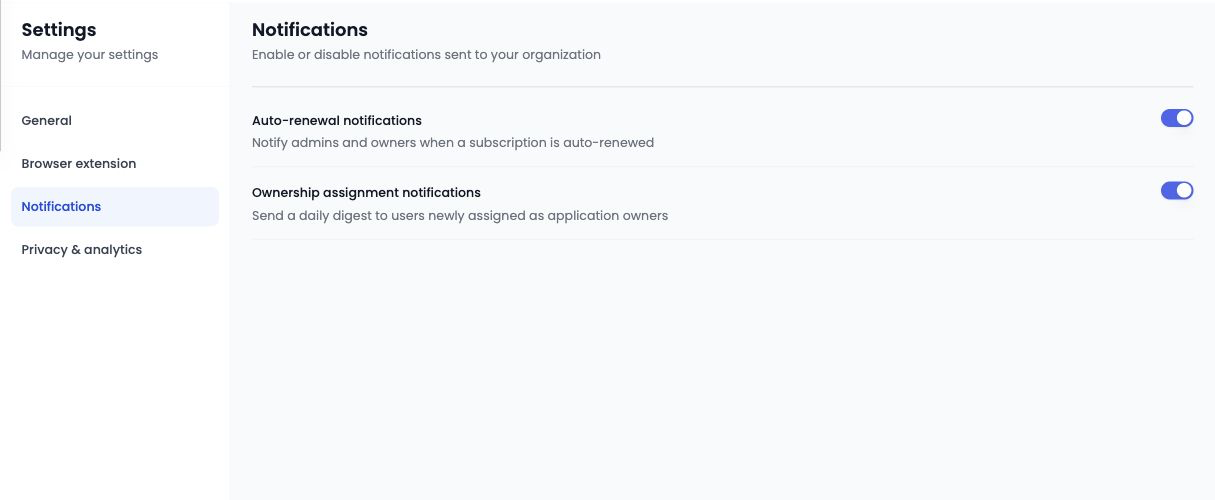
Administrators can now manage auto-renewal alerts and the daily ownership-assignment digest from **Settings → Notifications**.

<figure><img src="https://1674559363-files.gitbook.io/~/files/v0/b/gitbook-x-prod.appspot.com/o/spaces%2FvSdGShklbloRzyUwwMzX%2Fuploads%2Fgit-blob-99d69d1d6260150c313e48b1f5b528598a66a228%2Fboza-settings-notifications.png?alt=media" alt="Notification preferences in Boza Settings"><figcaption><p>Choose whether Boza sends renewal and ownership-assignment notifications.</p></figcaption></figure>

[Review notification behavior →](/docs/resources/emails-and-notifications.md)

***

## April 2026 — Vendor cleanup and a safer review queue

<figure><img src="https://1674559363-files.gitbook.io/~/files/v0/b/gitbook-x-prod.appspot.com/o/spaces%2FvSdGShklbloRzyUwwMzX%2Fuploads%2Fgit-blob-db9d285227a32baf8faf8ce83d77e394ec88c166%2Fboza-changelog-2026-04-vendors.png?alt=media" alt="Illustration: the vendor directory with linked applications and cleanup actions"><figcaption></figcaption></figure>

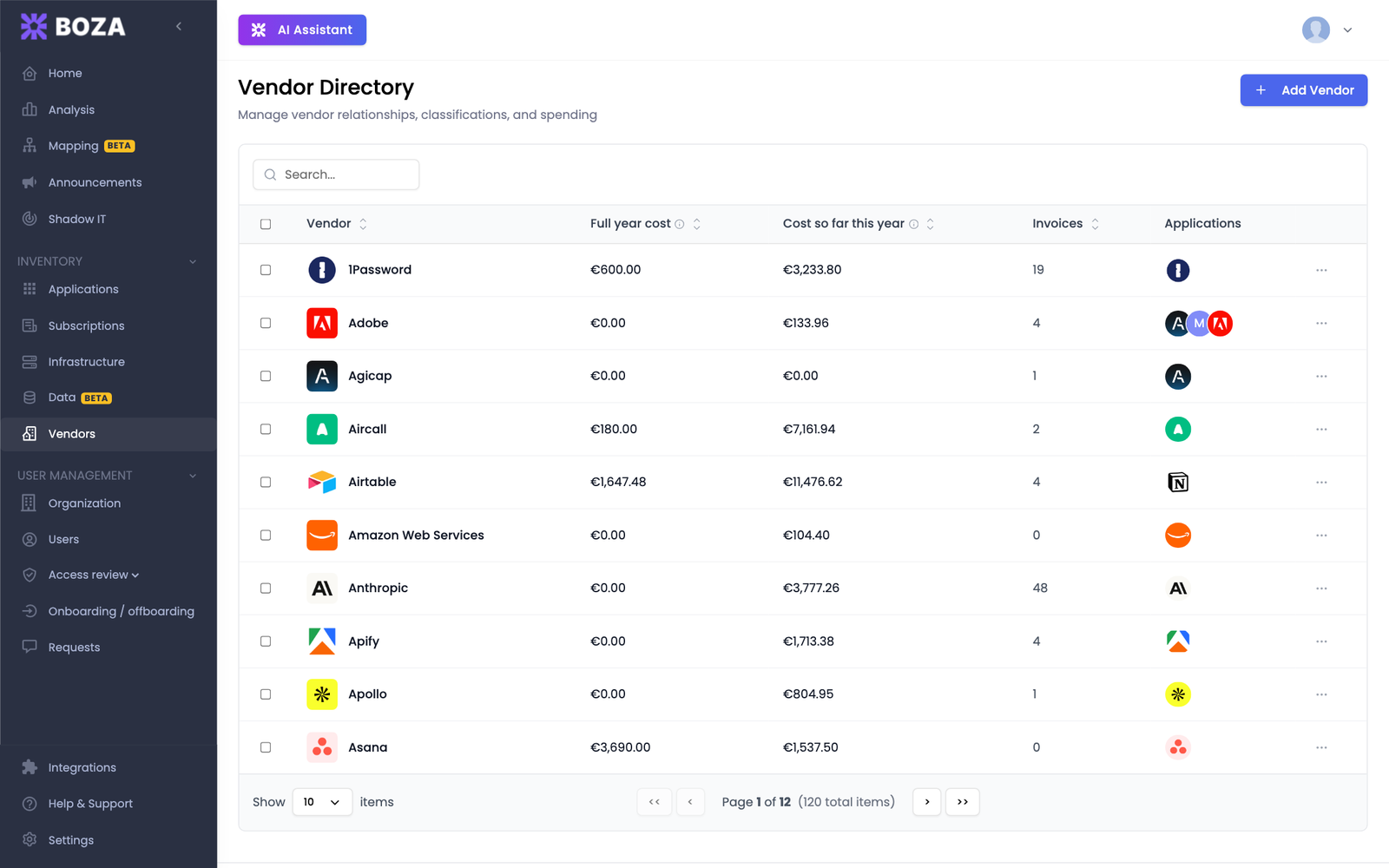
### Organize applications around the supplier relationship

The Vendor directory now supports the full maintenance workflow.

* Create and edit vendors.
* Link or unlink their applications.
* Review connected payment information.
* Store the website, service-level agreement, accounting label, bank-transaction label, and internal notes.
* Delete and block a false-positive vendor so a future sync does not recreate it.

**Why it matters:** finance labels, applications, and supplier context stay attached to one record, while exclusions reduce recurring cleanup.

<figure><img src="https://1674559363-files.gitbook.io/~/files/v0/b/gitbook-x-prod.appspot.com/o/spaces%2FvSdGShklbloRzyUwwMzX%2Fuploads%2Fgit-blob-5743a59e5e1b101c9739b8b046cb9b89e5dde627%2Fboza-vendors.png?alt=media" alt="The vendor directory in Boza"><figcaption><p>Maintain vendor context and the applications linked to each supplier.</p></figcaption></figure>

[Maintain the Vendor directory →](/docs/inventory/vendors.md)

### Resolve detected subscriptions instead of leaving them stuck

The detected-subscription pipeline now supports approval, retry, cleanup, and fuzzy license matching.

* Retry invoices that failed during processing.
* Approve ready records in bulk.
* Move or merge items when extraction selected the wrong application.
* Dismiss detections that should not become subscriptions.

[Understand pending, needs-review, and failed records →](/docs/inventory/subscriptions-and-vendors.md#understand-the-tabs-and-statuses)

### Explore Boza before connecting production data

New workspaces can open with sample data and a guided demo so administrators can learn the navigation before connecting identity, accounting, or browser-extension sources.

[Use the demo workspace →](/docs/getting-started/demo-workspace.md)

***

## March 2026 — Invoice extraction and broader integrations

<figure><img src="https://1674559363-files.gitbook.io/~/files/v0/b/gitbook-x-prod.appspot.com/o/spaces%2FvSdGShklbloRzyUwwMzX%2Fuploads%2Fgit-blob-9f53b17d198e7deb374f2d841fc384ad455f0824%2Fboza-changelog-2026-03-invoices-integrations.png?alt=media" alt="Illustration: invoice batch upload progress and the integration catalog"><figcaption></figcaption></figure>

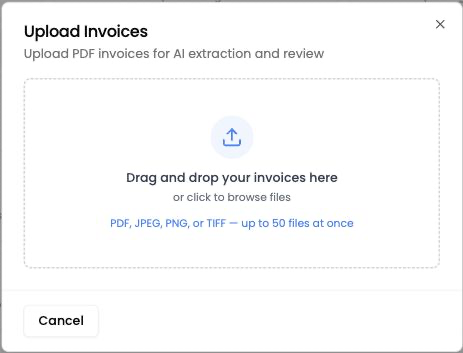
### Upload an invoice and review the extracted contract data

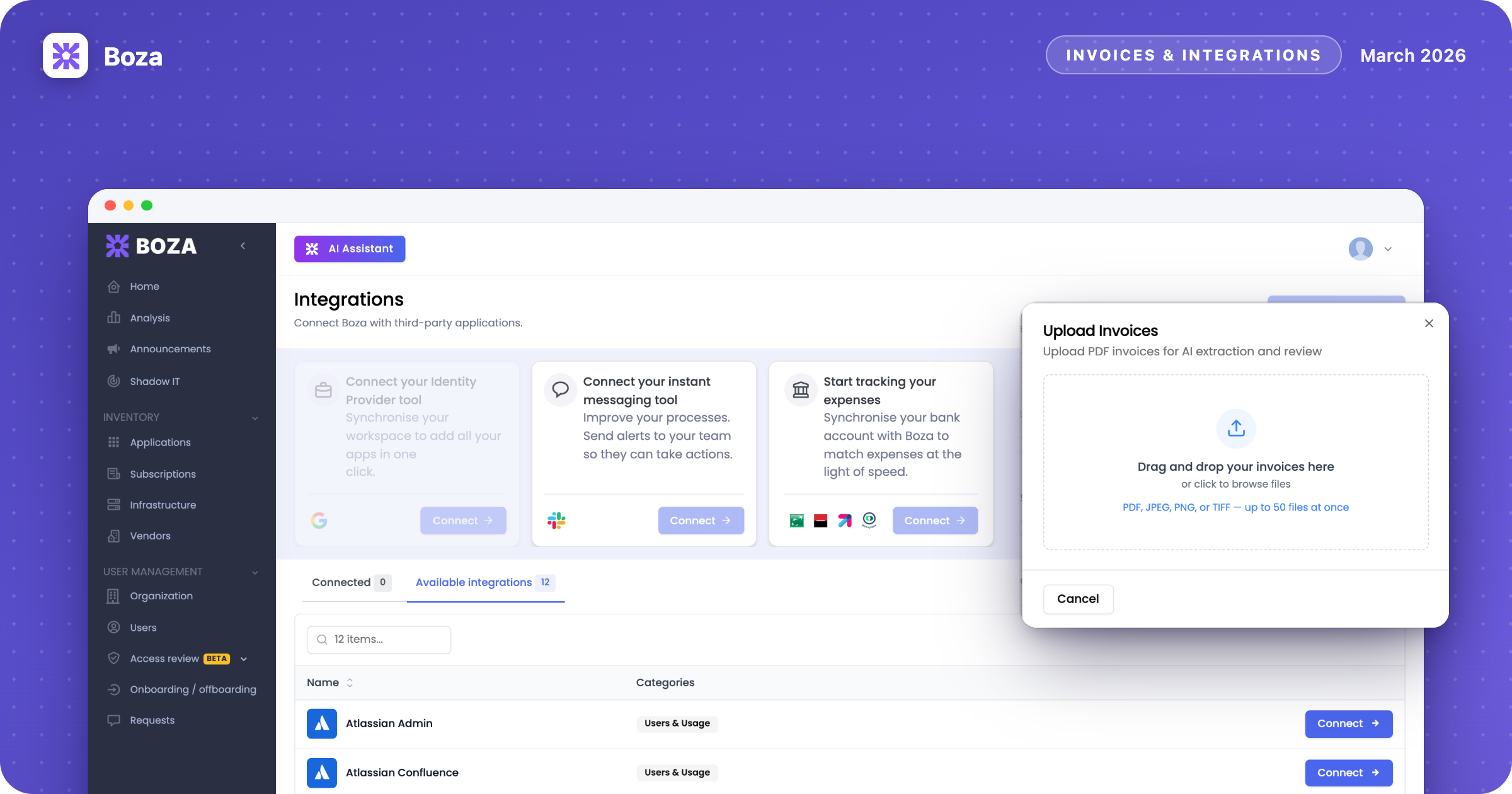
Boza can process PDF or image invoices, show extraction progress, and open the detected items for human review.

* Upload one document or a batch.
* Follow processing status.
* Review subscription, service, discount, and license information.
* Approve valid records, ignore irrelevant invoices, or re-parse an incorrect extraction.

<figure><img src="https://1674559363-files.gitbook.io/~/files/v0/b/gitbook-x-prod.appspot.com/o/spaces%2FvSdGShklbloRzyUwwMzX%2Fuploads%2Fgit-blob-7841e86ef51af1e98c7f32ec476e9a4a0bf449d2%2Fboza-invoice-upload.png?alt=media" alt="Invoice upload dialog in Boza"><figcaption><p>Add invoice files, choose whether to receive a completion email, and follow the batch.</p></figcaption></figure>

[Upload invoices →](/docs/inventory/subscriptions-and-vendors/upload-invoices.md)

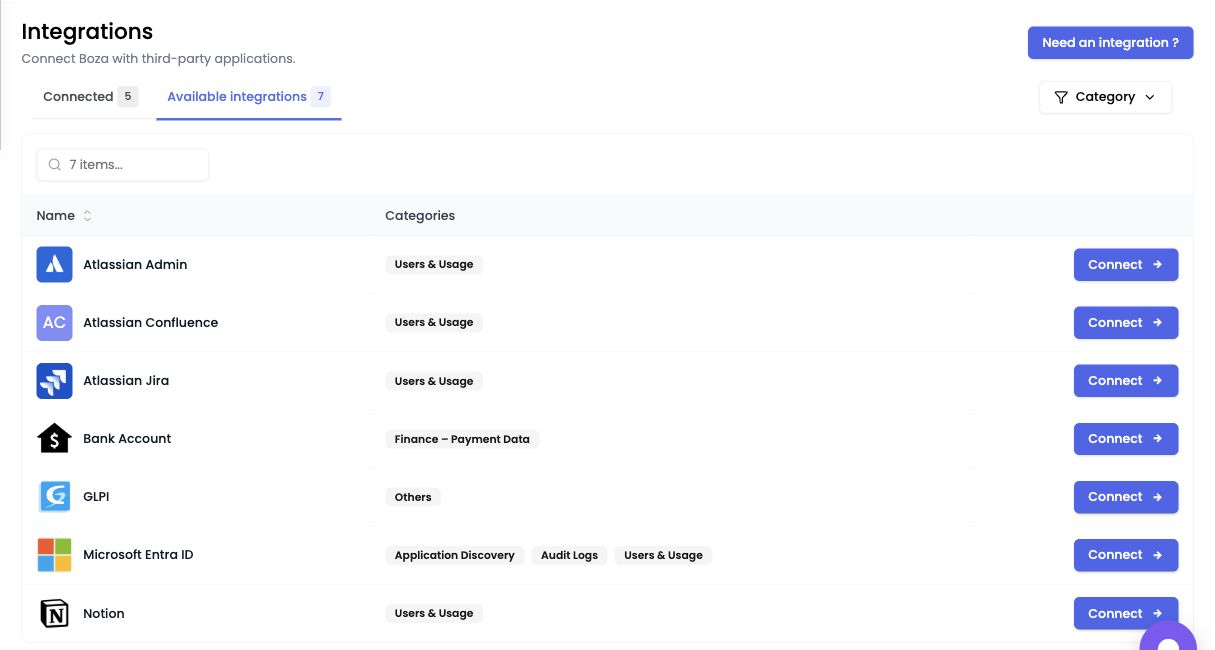
### Connect Atlassian and Notion

New connectors expand application and account visibility for Jira, Confluence, Atlassian Admin, and Notion.

<figure><img src="https://1674559363-files.gitbook.io/~/files/v0/b/gitbook-x-prod.appspot.com/o/spaces%2FvSdGShklbloRzyUwwMzX%2Fuploads%2Fgit-blob-b486839ceedfcf7b68c0659c300b9d81214a64ef%2Fboza-integrations.png?alt=media" alt="Integration catalog in Boza"><figcaption><p>Use the integration catalog to connect the data sources available to your workspace.</p></figcaption></figure>

[Review available integrations →](/docs/integrations/integrations.md)

### Safer identity-dependent actions

Team and organization actions that depend on Google Workspace or Microsoft Entra ID are disabled with a clear explanation until the required identity provider is connected.

**Why it matters:** administrators see why an action is unavailable before starting a workflow that cannot complete.

### Manage applications in bulk

The Applications table now includes:

* bulk owner assignment;
* approval-status indicators;
* application-category badges.

[Manage the application inventory →](/docs/inventory/applications.md)

***

*Questions about an update or its availability? Contact **<support@getboza.io>**.*


---

# Agent Instructions
This documentation is published with GitBook. GitBook is the documentation platform designed so that both humans and AI agents can read, navigate, and reason over technical content effectively. Learn more at gitbook.com.

## Querying This Documentation
If you need additional information that is not directly available in this page, you can query the documentation by asking a question.

Perform an HTTP GET request on the following URL with the `ask` and `goal` query parameters:

```
GET https://boza.gitbook.io/docs/resources/changelog.md?ask=<question>&goal=<user_goal>
```

`ask` is the immediate question: it should be specific, self-contained, and written in natural language.
`goal` is what the user is ultimately trying to achieve, the reason they need the answer. Sharing it helps GitBook give you a better, more relevant answer. A goal is most helpful when it describes the outcome the user wants rather than restating the question. For example, with `ask=how do I create an API token`, a goal like `automate deployments from our CI pipeline` lets GitBook tailor the answer to that use case.

The response will contain a direct answer to the question and relevant excerpts and sources from the documentation.

Use this mechanism when the answer is not explicitly present in the current page, you need clarification or additional context, or you want to retrieve related documentation sections.