> For the complete documentation index, see [llms.txt](https://boza.gitbook.io/docs/llms.txt). Markdown versions of documentation pages are available by appending `.md` to page URLs; this page is available as [Markdown](https://boza.gitbook.io/docs/tutorials/merge-duplicate-applications.md).
# Merge Duplicate Applications
Consolidate two or more entries that describe the same application into one record, without losing users, licenses, subscriptions, or history.
Select the entries, pick the one that survives, confirm.
## Before you start
* You are a workspace **Admin**. Only admins see **Merge**.
* The entries really are the same tool. A merge cannot be undone.
## Option A — Review the duplicates Boza found
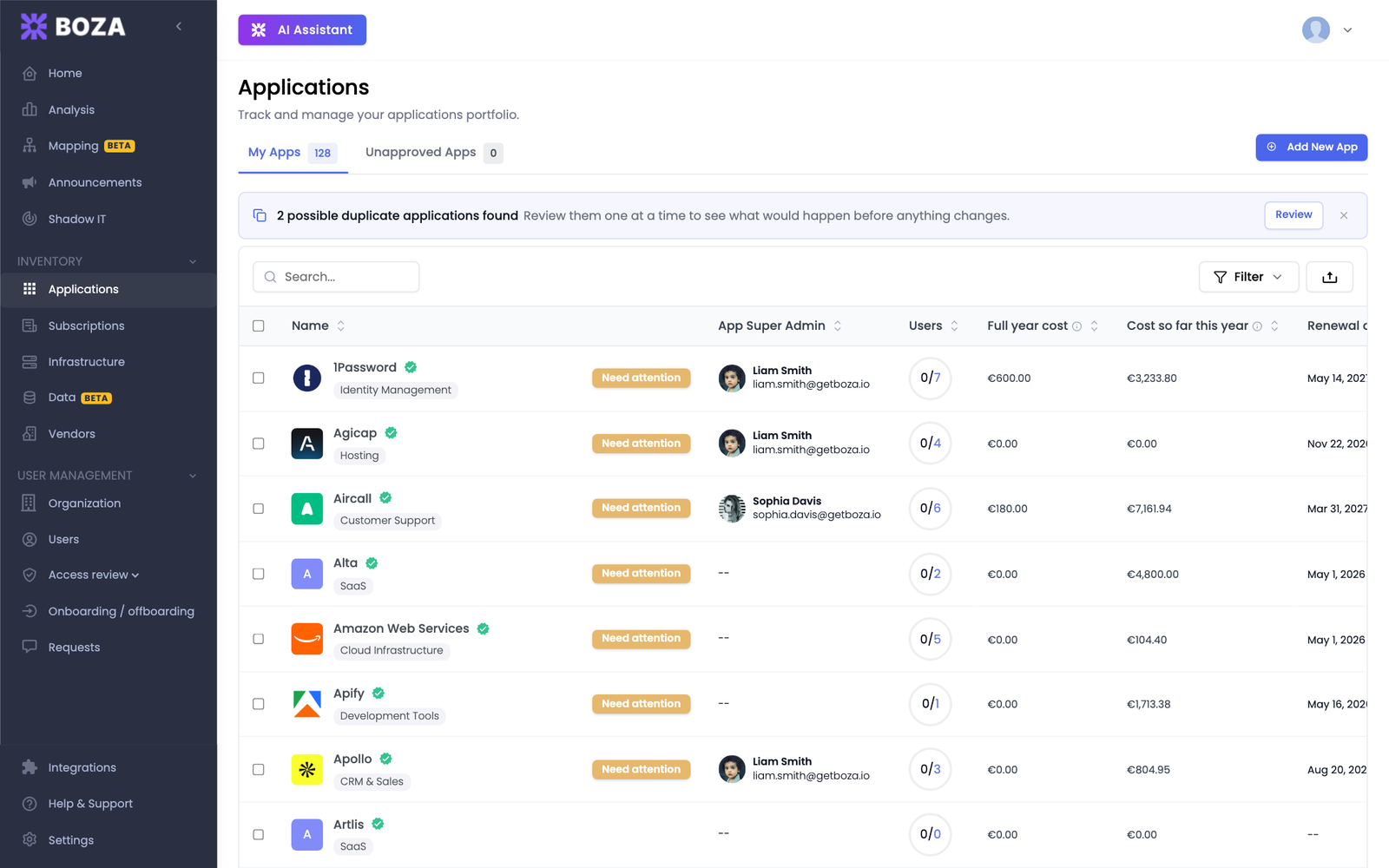
Boza compares the names in your inventory once punctuation and company suffixes are removed, so *Notion* and *Notion Inc.* are flagged, while two genuinely different tools are not.
1. Open **Applications**. When Boza has found candidates, a banner at the top of the list reads **N possible duplicate applications found**.
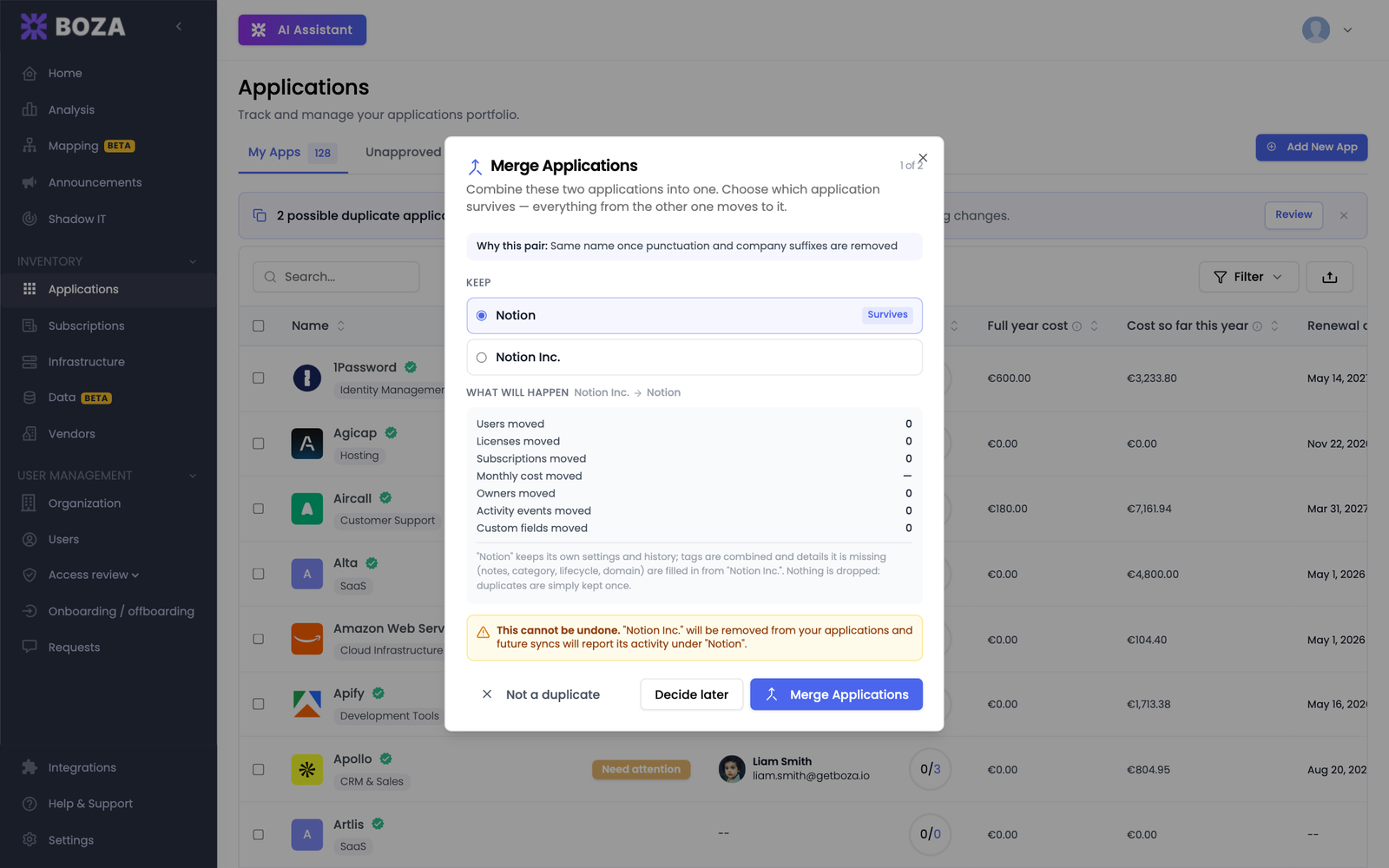
2. Click **Review**. The dialog explains **why this pair** was flagged and proposes which entry survives.
3. Read **What will happen**: the users, licenses, subscriptions, monthly cost, owners, activity events, and custom fields that move to the surviving entry. Anything already present on both sides is kept once.
4. Choose one of the three actions:
* **Merge Applications** performs the merge.
* **Not a duplicate** dismisses the pair for good; Boza will not suggest it again.
* **Decide later** closes the dialog and keeps the pair in the banner.
When several pairs are waiting, the dialog moves to the next one after each decision (**1 of 2**, **2 of 2**).
## Option B — Merge entries yourself
Use this when you spot duplicates Boza did not flag, or when the same tool exists three or four times.
1. Open **Applications** and search for the tool, so its entries sit together.
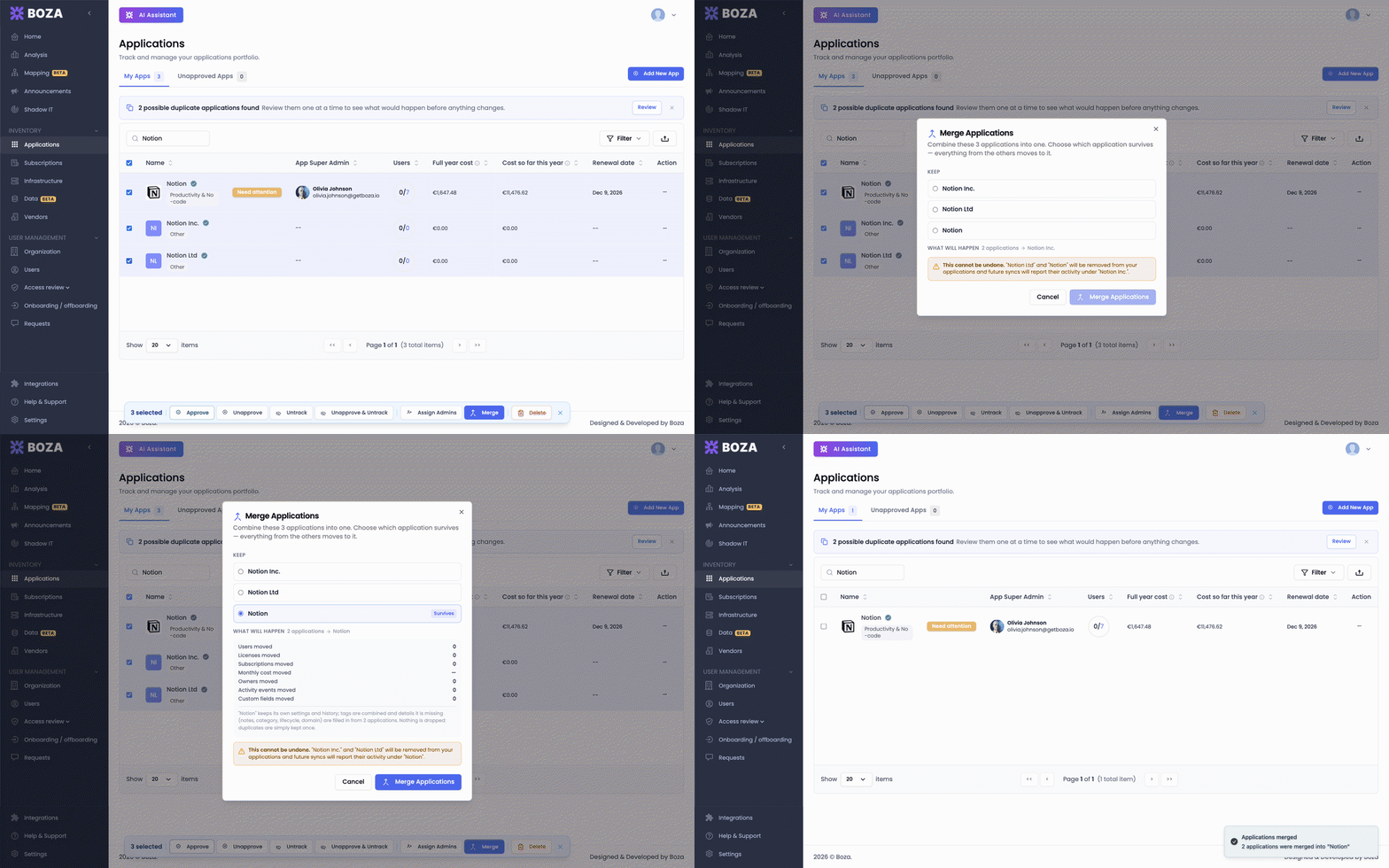
2. Tick the box of every entry to merge. Two or more can be selected, and the selection bar appears at the bottom of the window.
3. Click **Merge** in the selection bar.
4. Under **Keep**, select the entry that survives. Everything from the others moves onto it. The preview recomputes for the survivor you chose.
5. Check the warning: it names every entry that will be removed.
6. Click **Merge Applications**.
## Expected result
A confirmation toast names the merged entries, the list refreshes, and only the surviving application remains. Its detail page now carries the combined tags, owners, custom fields, and history.
Later identity-provider syncs, license imports, and invoices attribute their data to the surviving application instead of recreating the duplicate.
{% hint style="warning" %}
A merge cannot be undone. If you removed the wrong entry, add the application again from **Add New App**; it returns as a normal tracked application, but the merged history stays on the survivor.
{% endhint %}
## Troubleshooting
* **Merge is greyed out.** Select at least two entries; the tooltip on the button says so.
* **The banner is gone but I still see duplicates.** Boza only flags pairs whose names match after normalization. Use Option B for the rest.
* **A dismissed pair should be merged after all.** Select both entries and merge them from the selection bar; dismissing only stops the suggestion.
## Related guides
* [Applications](/docs/inventory/applications.md#merge-duplicate-applications)
* [Merge duplicate vendors](/docs/tutorials/merge-duplicate-vendors.md)
* [Act on several applications at once](/docs/tutorials/select-and-act-in-bulk.md)
---
# Agent Instructions
This documentation is published with GitBook. GitBook is the documentation platform designed so that both humans and AI agents can read, navigate, and reason over technical content effectively. Learn more at gitbook.com.
## Querying This Documentation
If you need additional information that is not directly available in this page, you can query the documentation by asking a question.
Perform an HTTP GET request on the following URL with the `ask` and `goal` query parameters:
```
GET https://boza.gitbook.io/docs/tutorials/merge-duplicate-applications.md?ask=&goal=
```
`ask` is the immediate question: it should be specific, self-contained, and written in natural language.
`goal` is what the user is ultimately trying to achieve, the reason they need the answer. Sharing it helps GitBook give you a better, more relevant answer. A goal is most helpful when it describes the outcome the user wants rather than restating the question. For example, with `ask=how do I create an API token`, a goal like `automate deployments from our CI pipeline` lets GitBook tailor the answer to that use case.
The response will contain a direct answer to the question and relevant excerpts and sources from the documentation.
Use this mechanism when the answer is not explicitly present in the current page, you need clarification or additional context, or you want to retrieve related documentation sections.